Nop4.50: differenze tra le versioni

Da Webmobili Wiki.
Creata pagina con "AAA"
 
 
(21 versioni intermedie di 2 utenti non mostrate)
Riga 1: Riga 1:
AAA
== Installare Nop 4.50 ==
In questa guida saranno evidenziati in <code style="color:red;font-weight:bold;">rosso</code> tutti i file del core di Nop che verranno toccati.
 
=== Operazioni sul DB ===
* Creare un dump del database di produzione (Nop precedente)
* Ripristinarlo
* Per ripristinare l'utente '''wmuser''' è necessario disassociarlo dal catalogo fulltext
* Da SQL Management Aprire <code>Storage -> Fulltext Catalogs -> nopCommerceFullTextCatalog</code>, nella tab ''General'' impostare come ''Owner'' => '''dbo'''
* Eliminare l'utente '''wmuser'''
* Ri-mappare l'utente '''wmuser''' sul database nuovo
* Aprire di nuovo <code>Storage -> Fulltext Catalogs -> nopCommerceFullTextCatalog</code>, nella tab ''General'' inserire come ''Owner'' => '''wmuser'''
* Aprire di nuovo <code>Storage -> Fulltext Catalogs -> nopCommerceFullTextCatalog</code>, nella tab ''Tables/Views'', pannello ''Eligible columns'' impostare '''italian''' per tutti i campi
* Creazione dei sinonimi: <syntaxhighlight lang="sql">CREATE SYNONYM [dbo].[Db_NopMapping_Occasioni] FOR [_Designbest].[dbo].[NopMapping_Occasioni]
CREATE SYNONYM [dbo].[TP_Occasioni] FOR [_Trovaprodotti].[dbo].[Occasioni]</syntaxhighlight>
 
=== Configurazione della Solution ===
* Aggiornare i file <code>Presentation\Nop.Web\App_Data\dataSettings.json</code> e <code>Presentation\Nop.Web\App_Data\appsettings.json</code>
* Copiare i plugin di terze parti nella cartella <code>Plugins\Nop.Plugin.Compiled</code>
* Aggiungere il seguente codice nei ''build events'' => ''post build event'' progetto Nop.Web <syntaxhighlight>xcopy /y /E $(SolutionDir)Plugins\Nop.Plugin.Compiled $(SolutionDir)Presentation\Nop.Web\Plugins</syntaxhighlight> per copiare i plugin compilati (7spikes & co) nel corretto folder durante il build.
* Creare dal ''Configuration Manager'' una nuova ''Solution Configuration'' chiamata '''ReleaseTest'''
* '''QUESTA PARTE NON L'ABBIAMO FATTA''' Tasto destro sul '''web.config''' e cliccare su ''Add Configs Transform'' per creare i '''web.Release.config''' e '''web.ReleaseTest.config'''
** Nel '''web.config''' aggiungere la variabile d'ambiente ASPNETCORE_ENVIRONMENT con valore ''Development'' sotto la sezione ''aspNetCore'' <syntaxhighlight lang="xml"><environmentVariables>
  <environmentVariable name="ASPNETCORE_ENVIRONMENT" value="Development" />
</environmentVariables></syntaxhighlight>
** Nel '''web.ReleaseTest.config''' mettere il valore ''Testing'' <syntaxhighlight lang="xml"><environmentVariables>
  <environmentVariable name="ASPNETCORE_ENVIRONMENT" value="Testing" xdt:Transform="SetAttributes" xdt:Locator="Match(name)" />
</environmentVariables></syntaxhighlight>
** nel '''web.Release.config''' mettere il valore ''Production'' <syntaxhighlight lang="xml"><environmentVariables>
  <environmentVariable name="ASPNETCORE_ENVIRONMENT" value="Production" xdt:Transform="SetAttributes" xdt:Locator="Match(name)" />
</environmentVariables></syntaxhighlight>
* Dalle proprietà dei progetti
** ''Nop.Web''
**''Nop.Data''
** ''Not.Core''<br/> andare sulla tab ''Build'', selezionare la configurazione ''Release'' e aggiungere il simbolo condizionale '''OFFICIAL'''
* Configuriamo l'applicazione in modo che cambi file di configurazione a seconda della Solution Configuration selezionata
** In <code style="color:red;font-weight:bold;">Libraries\Nop.Data\NopDataSettingsDefaults.cs</code> cambiare l'assegnamento di '''FilePath''' con quanto segue <syntaxhighlight lang="c#">        public static string FilePath =>
#if DEBUG
            "~/App_Data/dataSettings.development.json";
 
#elif !OFFICIAL
            "~/App_Data/dataSettings.testing.json";
 
#else
            "~/App_Data/dataSettings.json";
 
#endif</syntaxhighlight>
 
'''ATTENZIONE''' NopCommerce, probabilmente per sicurezza, ad ogni RUN cancella il file, le bestemmie sono d'obbligo.<br/>
Per quanto riguarda il DEBUG conviene evitare che lo faccia <code style="color:red;font-weight:bold;">Libraries\Nop.Data\DataSettingsManager.cs</code>
<syntaxhighlight lang="c#">
public static DataConfig LoadSettings(INopFileProvider fileProvider = null, bool reload = false)
{
if (!reload && Singleton<DataConfig>.Instance is not null)
return Singleton<DataConfig>.Instance;
 
//backward compatibility
fileProvider ??= CommonHelper.DefaultFileProvider;
var filePath_json = fileProvider.MapPath(NopDataSettingsDefaults.FilePath);
var filePath_txt = fileProvider.MapPath(NopDataSettingsDefaults.ObsoleteFilePath);
if (fileProvider.FileExists(filePath_json) || fileProvider.FileExists(filePath_txt))
{
var dataSettings = fileProvider.FileExists(filePath_json)
? LoadDataSettingsFromOldJsonFile(fileProvider.ReadAllText(filePath_json, Encoding.UTF8))
: LoadDataSettingsFromOldTxtFile(fileProvider.ReadAllText(filePath_txt, Encoding.UTF8))
?? new DataConfig();
#if !DEBUG
fileProvider.DeleteFile(filePath_json);
#endif
fileProvider.DeleteFile(filePath_txt);
 
AppSettingsHelper.SaveAppSettings(new List<IConfig> { dataSettings }, fileProvider);
Singleton<DataConfig>.Instance = dataSettings;
}
else
{
Singleton<DataConfig>.Instance = Singleton<AppSettings>.Instance.Get<DataConfig>();
}
 
return Singleton<DataConfig>.Instance;
}
</syntaxhighlight>
 
** In <code style="color:red;font-weight:bold;">Libraries\Nop.Core\Configuration\NopConfigurationDefaults.cs</code> cambiare l'assegnamento di '''AppSettingsFilePath''' con quanto segue <syntaxhighlight lang="c#">        public static string AppSettingsFilePath =>
#if DEBUG
            "App_Data/appsettings.development.json";
 
#elif !OFFICIAL
            "App_Data/appsettings.testing.json";
 
#else
            "App_Data/appsettings.json";
 
#endif</syntaxhighlight>
* Addare alla Solution (cartella Libraries) i progetti ''GenericUtilites'', ''WM4Search'', ''WM_Core'' e ''USO''
* Nel ''Solution Explorer'', sotto ''Dependencies'' cliccare col destro su ''Projects'' e selezionare ''Add Project Reference'' selezionando questi quattro appena addati
* Runnando la Solution dovrebbe partire con tutti i plugin disabilitati. Una volta entrati in admin è possibile vederli dall'elenco e installarli.
* Non ci saranno tutti i plugin, in tal caso cliccare su '''ricaricare la lista di plugin''', la soluzione si chiuderà da sola, ma al successivo login la lista dovrebbe essere aggiornata.
* Aggiornare tutti i pacchetti nuGet della Solution che abbiano un update minor (dalla seconda cifra in poi)
Aggiornando '''LigerShark.WebOptimizer.Core''' si generano degli errori nel progetto '''Nop.Web.Framework'''.<br/>
Con l'aggiornamento è stato aggiunto un nuovo argomento obbligatorio per la chiamata alla funzione
<syntaxhighlight lang="c#">
// trovare le occorrenze di
GenerateCacheKey(_actionContextAccessor.ActionContext.HttpContext)
 
// e aggiungere il secondo parametro così
GenerateCacheKey(_actionContextAccessor.ActionContext.HttpContext, new WebOptimizerOptions())
</syntaxhighlight>
* Creazione di '''IWMCoreModelFactory''' per le chiamate alla WMCore.
** INTERFACCIA: creare <code>Presentation\Nop.Web\Factories\IWMCoreModelFactory.cs</code> così <syntaxhighlight lang="c#">using GPC.WM_Core;
 
namespace Nop.Web.Factories {
  public interface IWMCoreModelFactory {
    WMRetriever WMCore { get; }
  }
}</syntaxhighlight>
** IMPLEMENTAZIONE: creare <code>Presentation\Nop.Web\Factories\WMCoreModelFactory.cs</code> così <syntaxhighlight lang="c#">using GPC.WM_Core;
using Microsoft.Extensions.Configuration;
 
namespace Nop.Web.Factories {
  public class WMCoreModelFactory : IWMCoreModelFactory {
    public WMRetriever WMCore { get; } = null;
 
    public WMCoreModelFactory(IConfiguration configuration) {
      WMCore = new WMRetriever(
        configuration.GetSection("WMConnectionStrings")["Designbest"],
        configuration.GetSection("WMConnectionStrings")["Designbest"],
        configuration.GetSection("WMConnectionStrings")["Trovaprodotti"],
        configuration.GetSection("WMApplicationSettings")["ResourcesPath"],
        "Test_WM47");
    }
  }
}</syntaxhighlight>
** BINDING: comunicare la sua esistenza al framework modificando <code style="color:red;font-weight:bold;">Presentation\Nop.Web\Program.cs</code> aggiungendo una riga a ConfigureServices() così
<syntaxhighlight lang="c#">
// Aggiunta servizi relativi a Webmobili
builder.Services.AddSingleton<IWMCoreModelFactory, WMCoreModelFactory>();
</syntaxhighlight>
* Inserimento di '''UsoUtilitiesController''' uguale a quello precedente con la differenza che le chiamate a services sono diventate tutte ASYNC e perciò il trucco è aggiungere al fondo <code>.Result</code> per le variabili o <code>.Wait()</code> per i metodi come ad esempio <syntaxhighlight lang="c#">Customer customer = _customerService.GetCustomerByGuidAsync(customerGuid).Result;
_authenticationService.SignInAsync(customer, true).Wait();</syntaxhighlight>
 
=== Url Rewrite ===
Cambiare le regole di rewrite, i '''prodotti''' sotto <code>/catalogo-prodotti</code> , le '''categorie''' sotto <code>/catalogo</code> e i '''cataloghi''' sotto <code>/brand</code>
 
Modificare in <code>Nop.Web\Infrastructure\GenericUrlRouteProvider.cs</code>
<syntaxhighlight lang="c#">
using Microsoft.AspNetCore.Builder;
using Microsoft.AspNetCore.Routing;
using Nop.Data;
using Nop.Web.Framework.Mvc.Routing;
 
namespace Nop.Web.Infrastructure {
  /// <summary>
  /// Represents provider that provided generic routes
  /// </summary>
  public partial class GenericUrlRouteProvider : BaseRouteProvider, IRouteProvider {
    #region Methods
 
    /// <summary>
    /// Register routes
    /// </summary>
    /// <param name="endpointRouteBuilder">Route builder</param>
    public void RegisterRoutes(IEndpointRouteBuilder endpointRouteBuilder) {
      var lang = GetLanguageRoutePattern();
      #region WEBMOBILI
      string constProducts = "catalogo-prodotti";
      string constCategories = "catalogo";
      string constManufacturers = "brand";
      #endregion
      //default routes
      //these routes are not generic, they are just default to map requests that don't match other patterns,
      //but we define them here since this route provider is with the lowest priority, to allow to add additional routes before them
      if (!string.IsNullOrEmpty(lang)) {
        endpointRouteBuilder.MapControllerRoute(name: "DefaultWithLanguageCode",
            pattern: $"{lang}/{{controller=Home}}/{{action=Index}}/{{id?}}");
      }
 
      endpointRouteBuilder.MapControllerRoute(name: "Default",
          pattern: "{controller=Home}/{action=Index}/{id?}");
 
      if (!DataSettingsManager.IsDatabaseInstalled())
        return;
 
      //generic routes
      var genericPattern = $"{lang}/{{SeName}}";
     
      #region WEBMOBILI
      endpointRouteBuilder.MapDynamicControllerRoute<SlugRouteTransformer>(constProducts + "/{SeName}");
      endpointRouteBuilder.MapDynamicControllerRoute<SlugRouteTransformer>(constCategories + "/{SeName}");
      endpointRouteBuilder.MapDynamicControllerRoute<SlugRouteTransformer>(constManufacturers + "/{SeName}");
      #endregion
 
      endpointRouteBuilder.MapDynamicControllerRoute<SlugRouteTransformer>(genericPattern);
 
      endpointRouteBuilder.MapControllerRoute(name: "GenericUrl",
          pattern: "{genericSeName}",
          defaults: new { controller = "Common", action = "GenericUrl" });
 
      endpointRouteBuilder.MapControllerRoute(name: "GenericUrlWithParameter",
          pattern: "{genericSeName}/{genericParameter}",
          defaults: new { controller = "Common", action = "GenericUrl" });
 
      endpointRouteBuilder.MapControllerRoute(name: "Product",
          pattern: $"{lang}/{constProducts}/{{SeName}}",
          defaults: new { controller = "Product", action = "ProductDetails" });
 
      endpointRouteBuilder.MapControllerRoute(name: "Category",
          pattern: $"{lang}/{constCategories}/{{SeName}}",
          defaults: new { controller = "Catalog", action = "Category" });
 
      endpointRouteBuilder.MapControllerRoute(name: "Manufacturer",
          pattern: $"{lang}/{constManufacturers}/{{SeName}}",
          defaults: new { controller = "Catalog", action = "Manufacturer" });
 
      endpointRouteBuilder.MapControllerRoute(name: "Vendor",
          pattern: genericPattern,
          defaults: new { controller = "Catalog", action = "Vendor" });
 
      endpointRouteBuilder.MapControllerRoute(name: "NewsItem",
          pattern: genericPattern,
          defaults: new { controller = "News", action = "NewsItem" });
 
      endpointRouteBuilder.MapControllerRoute(name: "BlogPost",
          pattern: genericPattern,
          defaults: new { controller = "Blog", action = "BlogPost" });
 
      endpointRouteBuilder.MapControllerRoute(name: "Topic",
          pattern: genericPattern,
          defaults: new { controller = "Topic", action = "TopicDetails" });
 
      endpointRouteBuilder.MapControllerRoute(name: "ProductsByTag",
          pattern: genericPattern,
          defaults: new { controller = "Catalog", action = "ProductsByTag" });
    }
 
    #endregion
 
    #region Properties
 
    /// <summary>
    /// Gets a priority of route provider
    /// </summary>
    /// <remarks>
    /// it should be the last route. we do not set it to -int.MaxValue so it could be overridden (if required)
    /// </remarks>
    public int Priority => -1000000;
 
    #endregion
  }
}
</syntaxhighlight>
 
=== Prodotto ===
* Aggiunta metodi frmt() di utilità nelle viste per restituire decimali in <code>Nop.Web\Extensions\HtmlExtensions.cs</code>:
<syntaxhighlight lang="c#">
    /// Restituisce (come stringa) il numero decimale specificato inserendo il punto
    /// ogni tre cifre. I numeri decimali sono limitati a 2
    /// </summary>
    /// <param name="val">Un decimal</param>
    /// <returns>Il numero nella forma mmm.kkk.uuu,dd</returns>
    public static string frmt(this decimal val) {
      var ci = new CultureInfo("it-IT");
      ci.NumberFormat.NumberDecimalDigits = 2;
      return val.ToString("N", ci);
    }
 
    /// Restituisce (come stringa) il numero intero specificato inserendo il punto
    /// ogni tre cifre.
    /// </summary>
    /// <param name="val">Un decimal</param>
    /// <returns>Il numero nella forma mmm.kkk.uuu,dd</returns>
    public static string frmt(this int val) {
      var ci = new CultureInfo("it-IT");
      ci.NumberFormat.NumberDecimalDigits = 2;
      return val.ToString("N", ci);
    }
</syntaxhighlight>
 
* Nel '''modello''' del prodotto in <code>Nop.Web\Models\Catalog\ProductDetailsModel.cs</code> aggiungere:
<syntaxhighlight lang="c#">
#region WEBMOBILI
    /// <summary>
    /// Nella nostra struttura c'è sempre un solo manufacturer per prodotto. Questa property lo restituisce.
    /// In caso di manufacturer non settato (errore di dati) restituisce un manu vuoto per evitare una NullPointerException
    /// </summary>
    public ManufacturerBriefInfoModel Manufacturer {
      get {
        if (ProductManufacturers.Count > 0) {
          return ProductManufacturers[0];
        }
        return new ManufacturerBriefInfoModel { Name = "", SeName = "", IsActive = false };
      }
    }
 
    public string ShopCity { get; set; }
 
    public decimal AdditionalShippingCharge { get; set; }
 
    #endregion
</syntaxhighlight>
 
* '''ProductController''': al momento dichiarata l'istanza dell'interfaccia IWMCoreModelFactory, ma non utilizzata, i campi necessari sono stati aggiunti direttamente nel modello del prodotto, aggiungiamo quindi solo questa istruzione nel metodo ''ProductDetails(int productId, int updatecartitemid = 0)'':
<syntaxhighlight lang="c#">
#region WEBMOBILI
      model.AdditionalShippingCharge = product.AdditionalShippingCharge; // spese di spedizione da stampare in frontend
#endregion
</syntaxhighlight>
 
* Nella '''vista''' del prodotto, copiare la vista del tema base <code>Nop.Web\Views\Product\_DeliveryInfo.cs</code> in <code>Nop.Web\Themes\Brooklyn\Views\Product\_DeliveryInfo.cs</code> e modificarla così:
<syntaxhighlight lang="c#">
@model ProductDetailsModel
@if (Model.FreeShippingNotificationEnabled && Model.IsFreeShipping@*|| !string.IsNullOrWhiteSpace(Model.DeliveryDate)*@) {
<div class="delivery">
  <script asp-location="Footer">
    $(document).on("product_attributes_changed", function (data) {
      if (data.changedData.isFreeShipping) {
        $("#free-shipping-" + data.changedData.productId).removeClass("invisible");
      } else {
        $("#free-shipping-" + data.changedData.productId).addClass("invisible");
      }
    });
  </script>
  @if (Model.FreeShippingNotificationEnabled && Model.IsFreeShipping) {
    <div id="free-shipping-@Model.Id" class="free-shipping">@T("Products.FreeShipping")</div>
  }
  @if (!string.IsNullOrWhiteSpace(Model.DeliveryDate)) {
    <div class="delivery-date">
      <span class="label">@T("Products.DeliveryDate"):</span>
      <span class="value">@Model.DeliveryDate</span>
    </div>
  }
</div>
}
else {
<div class="delivery">
  @if (Model.IsShipEnabled) {
    <div class="free-shipping">
      <span class="label">SPEDIZIONE STANDARD ITALIA € @Model.AdditionalShippingCharge.frmt() <span class="testo-minuscolo">(cad.)</span></span>
    </div>
    @if (!string.IsNullOrWhiteSpace(Model.DeliveryDate)) {
      <div class="delivery-date">
        <span class="label">@T("Products.DeliveryDate"):</span>
        <span class="value">@Model.DeliveryDate</span>
      </div>
    }
  }
  else {
    <div class="free-shipping">
      <span class="label">SPEDIZIONE PERSONALIZZATA A PREVENTIVO</span>
    </div>
  }
</div>
}
</syntaxhighlight>
 
 
=== Integrazione di 4Dem ===
All'interno della action ''SubscribeNewsletter'' di <code>Presentation\Nop.Web\Controllers\NewsletterController.cs</code> aggiungiamo la chiamata alle API di 4Dem per registrare il cliente nella nostra lista.
Prima importiamo <code>WMCoreModelFactory</code> nel controller.<br/>
<syntaxhighlight lang="c#">#region DESIGNBEST-4DEM
if (subscribe) {
_wmcore.WMCore.FourDemAddSubscriber(70904,email,"shop", _workContext.GetWorkingLanguageAsync().Result.LanguageCulture.Split('-').First().ToUpper(),"1", Request.HttpContext.Connection.RemoteIpAddress.ToString());
}
#endregion</syntaxhighlight>
dopo l'assegnazione di ''success''.
Ricordarsi di importare <code>using System.Linq;</code>
 
Aggiungere lo script di tracking di 4dem nella master page in <code>Presentation\Nop.Web\Themes\Pacific\Views\Shared\_Root.Head.cshtml</code>
<syntaxhighlight lang="html">
<!-- 4Dem - Email Automation Tracker - Start -->
<script type="text/javascript" charset="utf-8">var $atmTRK={'settings':{'cid':'RpsXFDFvAu','uid':'25i'}};(function(){var st=document.createElement('script');st.type='text/javascript';st.async=true;st.defer=true;st.src=('https:'==document.location.protocol?'https://trk.mktaut.com':'http://trk.mktaut.com')+'/assets/goaltracking.js';var s=document.getElementsByTagName('script')[0];s.parentNode.insertBefore(st,s);})();</script>
<!-- 4Dem - Email Automation Tracker - End -->
</syntaxhighlight>
 
=== SEO delle pagine HP e HP-CATALOGHI ===
Sembra che nella backoffice non ci sia la gestione dei '''meta title''' e '''description''' per le pagine HP e HP-Cataloghi.<br/>
Modificare la vista <code>Presentation\Nop.Web\Themes\Pacific\Views\Shared\_Root.Head.cshtml</code> commentando i meta title e description e sostituendo questo
<syntaxhighlight lang="xml">
  @{
    string currentpage = webhelper.GetThisPageUrl(true);
  }
 
  @if (currentpage == "https://localhost:44353/" || currentpage == "https://shop.designbest.com/" || currentpage == "https://shop.dbdemo47.com/") {
    <title>Designbest Shop | L'e-commerce del design</title>
    <meta name="description" content="Il meglio del design è in offerta su Shop Designbest: trova l'arredamento per la tua casa e acquista a prezzi scontati e con pronta consegna." />
 
  }
  else if (currentpage.EndsWith("/manufacturer/all")) {
    <title>Designbest Shop | I cataloghi dei migliori brand</title>
    <meta name="description" content="I prodotti delle migliori marche sono in offerta su Shop Designbest. Sfoglia i cataloghi di arredamento e finiture d’interni e acquista a prezzi scontati." />
  }
  else {
    <title>@Html.NopTitle()</title>
    <meta name="description" content="@(Html.NopMetaDescription())" />
  }
</syntaxhighlight>
 
=== Listing Prodotti ===
Personalizzazione del listing prodotti aggiungendo le seguenti info:
* Manufacturer Name
* Attributi del prodotto (ad esempio varianti colori)
 
Modificare la seguente vista<br/>
<code>\Presentation\Nop.Web\Themes\Pacific\Views\Shared\_ProductBox.cshtml</code>
 
<syntaxhighlight lang="c#">
// Aggiunte Designbest
@inject IManufacturerService manufacturerService
@inject IProductAttributeService productAttributeService;
@inject IPictureService pictureService;
 
//Controllo presenza attributi - ad esempio colori
ProductAttributeMapping productAttributeMapping = (await productAttributeService.GetProductAttributeMappingsByProductIdAsync(Model.Id)).Where(o => o.ProductAttributeId == 2).FirstOrDefault();
 
// Retrieving del Manufacturer
string manufacturerName = "";
var manuMapping = (await manufacturerService.GetProductManufacturersByProductIdAsync(Model.Id)).FirstOrDefault();
if (manuMapping != null) {
  var manufacturer = await manufacturerService.GetManufacturerByIdAsync(manuMapping.ManufacturerId);
  if (manufacturer != null && manufacturer.MetaKeywords != "_genus_") manufacturerName = manufacturer.Name;
}
 
///////////////////////////////////////////////////////////////////
// In base al tema aggiungere in pagina le seguenti parti di codice
///////////////////////////////////////////////////////////////////
 
//----- Aggiunta nome Manufacturer
@if (!String.IsNullOrEmpty(manufacturerName)) {   
  <span>@manufacturerName</span>
 
//----- Aggiunta Attributi - colore
@if (productAttributeMapping != null && productAttributeMapping.ProductAttributeId == 2) {
var valori = await productAttributeService.GetProductAttributeValuesAsync(productAttributeMapping.Id);
 
<div class="attributi" style="position: absolute; bottom: 2px; left: 6px;pointer-events:none;">
@foreach (var v in valori) {
@if (v.ColorSquaresRgb == null) {
  var pictureImageUrl = await pictureService.GetPictureUrlAsync(v.ImageSquaresPictureId);
<span style="display: inline-block;width:14px;height:14px;background-image:url('@pictureImageUrl');border-radius:100%;border:black solid 1px;"></span>
}
else {
<span style="display: inline-block;width:14px;height:14px;background-color:@v.ColorSquaresRgb;border-radius:100%;border:black solid 1px;"></span>
}
  }
</div>
}
 
}


</syntaxhighlight>
 
=== LATO ADMIN ===
 
Per cambiare l'immagine in alto a sinistra bisogna sovrascriverla qui <code>P:\DesignbestCommerce3\Presentation\Nop.Web\wwwroot\css\admin\images</code> per 2 versioni del menu(compatto e non) <code>logo.png 250x57</code> e <code>logo-mini.png</code>
 
==== Home - Vendor ====
* Nascondere il pulsante ''Visualizza'' nei best seller(un Vendor non deve entrare nella pagina di modifica del prodotto lato NOP), bisogna commentare l'ultima <code>ColumnProperty</code> in queste 2 viste:
<code>Nop.Web\Areas\Admin\Views\Home\_BestsellersBriefReportByAmount.cshtml</code> e
<code>Nop.Web\Areas\Admin\Views\Home\_BestsellersBriefReportByQuantity.cshtml</code>
 
==== Vendite - Ordini del Cliente ====
* Nascondere il filtro ''Magazzino'' (aggiungere la classe '''d-none'''), altrimenti un vendor potrebbe vedere le vendite degli altri vendor, vista da modificare <code>Nop.Web\Areas\Admin\Views\Order\List.cshtml</code>.
<syntaxhighlight lang="c#">
<div class="form-group row d-none" @(Model.AvailableWarehouses.SelectionIsNotPossible() ? Html.Raw("style=\"display:none\"") : null)>
  <div class="col-md-4">
    <nop-label asp-for="WarehouseId" />
  </div>
  <div class="col-md-8">
      <nop-select asp-for="WarehouseId" asp-items="Model.AvailableWarehouses" />
  </div>
</div>
</syntaxhighlight>
 
==== Ordine - dettaglio ====
* Modificare il '''modello''' <code>Nop.Web\Areas\Admin\Models\Orders\OrderItemModel.cs</code> aggiungendo <code>public string ProductSeoName { get; set; }</code>
 
* '''Factory''' <code>Nop.Web\Areas\Admin\Factories\OrderModelFactory.cs</code> valorizzare il campo ProductSeoName usando la WMCore, nel metodo <code>PrepareOrderItemModelsAsync</code>
<syntaxhighlight lang="c#">
ProductSeoName = _wmcore.WMCore.GetNopProductSeoName(orderItem.ProductId),
</syntaxhighlight>
 
* Nel box dove sono elencati i prodotti, il link del prodotti rimanderà alla scheda del prodotto nel frontend, mentre solo se siamo Admin entreremo nell'edit del prodotto di NOP [[File:Nop440_ordine_prodotti.PNG|center]] modificare in <code>Nop.Web\Areas\Admin\Views\Order\_OrderDetails.Products.cshtml</code>
** Dobbiamo recuperare il VendorID del dropship di Webmobili: <syntaxhighlight lang="c#">
@inject Nop.Services.Catalog.IProductService prodService;
@inject Microsoft.Extensions.Configuration.IConfiguration configuration;
@{
  int vendorWMDropship = 0;
  int.TryParse(configuration.GetSection("WMApplicationSettings")["DropshipVendorID"], out vendorWMDropship);
}
</syntaxhighlight>
** Controllo se l'utente è un Vendor o Admin <syntaxhighlight lang="c#">
<em>
@if (!Model.IsLoggedInAsVendor) {
  <a asp-controller="Product" asp-action="Edit" asp-route-id="@item.ProductId">@item.ProductName</a>
}else {
  <a href="@Url.RouteUrl("Product", new { SeName = item.ProductSeoName })" target="_blank">@item.ProductName</a>
}</em>
</syntaxhighlight>
** Se il vendorID è quello di Webmobili-dropship mostro il pulsante '''CLONA e ASSEGNA a RIVENDITORE'''.  Attenzione il metodo è cambiato da code>prodService.GetProductById(item.ProductId).VendorId</code> a <code>GetProductByIdAsync</code>: <syntaxhighlight lang="c#">
@{
var productById = await prodService.GetProductByIdAsync(item.ProductId);
}
@if (productById != null) {
if (productById.VendorId == vendorWMDropship) {
  <button type="button" id="setProductToVendor" name="setProductToVendor" class="btn bg-olive" onclick="apriModaleAssegnazione(@item.ProductId,@item.Id,'@item.ProductName','@item.PictureThumbnailUrl');" data-toggle="modal" data-target="#setProductToVendor-window"><i class="fa fa-clone"></i>
CLONA e ASSEGNA a RIVENDITORE</button>
}
}
</syntaxhighlight>
** Il pulsante '''CLONA e ASSEGNA a RIVENDITORE''' apre un modale in cui selezionare il rivenditore, innanzitutto dobbiamo creare la vista/componente del modale ''ProductToVendorModal'''. <br/>Creiamo il componente in <code>Nop.Web\Areas\Admin\Components\ProductToVendorModal.cs</code> così: <syntaxhighlight lang="c#">
using Microsoft.AspNetCore.Mvc;
using System;
using System.Collections.Generic;
using System.Linq;
using System.Threading.Tasks;
using Nop.Web.Framework.Components;
using Microsoft.Extensions.Configuration;
using Nop.Services.Vendors;
 
namespace Nop.Web.Areas.Admin.Components {
  public class ProductToVendorModal : NopViewComponent {
    private readonly IVendorService _vendorService;
    private readonly IConfiguration _configuration;
 
    public ProductToVendorModal(IVendorService vendorService, IConfiguration configuration) {
      _vendorService = vendorService;
      _configuration = configuration;
    }
 
    public IViewComponentResult Invoke() {
      int dropshippingVendorId = 0;
      int.TryParse(_configuration.GetSection("WMApplicationSettings")["DropshipVendorID"], out dropshippingVendorId);   
 
      var vendorList = _vendorService.GetAllVendorsAsync().Result
        .Where(c => c.Id != dropshippingVendorId)
        .OrderBy(o => o.Name).ToList();
 
      return View(vendorList);
    }
  }
}
</syntaxhighlight>
Creiamo la cartella e la vista del componente in <code>Nop.Web\Areas\Admin\Views\Shared\Components\ProductToVendorModal\Default.cshtml</code> così:
<syntaxhighlight lang="c#">
@model List<Nop.Core.Domain.Vendors.Vendor>
 
<div id="setProductToVendor-window" class="modal fade" tabindex="-1" role="dialog" aria-labelledby="setProductToVendor-window-title">
  <div class="modal-dialog">
    <div class="modal-content">
      <div class="modal-header">
        <button type="button" class="close" data-dismiss="modal" aria-label="Close"><span aria-hidden="true">&times;</span></button>
        <h4 class="modal-title" id="copyproduct-window-title">Seleziona il rivenditore a cui assegnare il prodotto venduto</h4>
      </div>
      <form asp-controller="Order" asp-action="CopyAndSetProductWMtoVendor" method="post">
        <div class="form-horizontal">
          <div class="modal-body">
            <input type="hidden" id="hdnProductId" name="productId" value="" />
            <input type="hidden" id="hdnOrderItemId" name="orderItemId" value="" />
            <div class="media">
              <a class="pull-left" href="#">
                <img id="modalProductToAssignThumb" class="media-object" src="">
              </a>
              <div class="media-body">
                <h4 id="modalProductToAssign" class="media-heading">...</h4>
                <p></p>
              </div>
            </div>
            <hr />
            <div class="form-group">
              <div class="col-md-8 mx-auto">
                <label>Seleziona il rivenditore:</label>
                <select name="vendorId" class="form-control">
                  @foreach (var vendor in Model) {
                    <option value="@vendor.Id">@vendor.Name</option>
                  }
                </select>
              </div>
 
            </div>
            <hr />
            <div>
              <span>Il prodotto verrà:</span>
              <ul>
                <li>clonato;</li>
                <li>assegnato al rivenditore selezionato;</li>
                <li>segnato come non pubblicato, ma sarà cmq visibile dal pannello di gestione del Rivenditore;</li>
                <li>segnato con quantita' di pezzi a 0 (al prodotto clonato, non all'originale).</li>
              </ul>
            </div>
          </div>
          <div class="modal-footer">
            <button type="submit" class="btn btn-primary">
              CLONA E ASSEGNA IL PRODOTTO
            </button>
          </div>
        </div>
      </form>
    </div>
  </div>
</div>
</syntaxhighlight>
 
Torniamo nella pagina contenitore di dettaglio dell'ordine in <code>Nop.Web\Areas\Admin\Views\Order\Edit.cshtml</code> e inseriamo al fondo la chiamata al nostro component modale appena creato con questa riga di codice:
<syntaxhighlight lang="c#">
@*Modal product to Vendor*@
@await Component.InvokeAsync("ProductToVendorModal")
</syntaxhighlight>
 
Aggiungere il seguente script:
<syntaxhighlight lang="c#">
function apriModaleAssegnazione(idProduct, idOrderitem, productName, imgThumb) {
  $('#hdnProductId').val(idProduct);
  $('#hdnOrderItemId').val(idOrderitem);
  $('#modalProductToAssign').text(productName);
  $('#modalProductToAssignThumb').attr('src', imgThumb);
}
</syntaxhighlight>
 
* '''ERRORI'''
<blockquote>
Durante il test di acquisto di prodotto DesignbestShop, in fase di selezione della spedizione
non ci sono opzioni e rimane lì e non avanza, probabilmente per assenza plugin spedizione.
</blockquote>
 
 
==== Update dei MessageTokens ====
Nel <code style="color:red;font-weight:bold;">Libraries\Nop.Services\Messages\MessageTokenProvider.cs</code> aggiungere i riferimenti ai servizi
* IVendorService
* IConfiguration
 
Nella property '''AllowedTokens''' aggiungere al fondo ''%Order.VendorDetail(s)%'' <syntaxhighlight lang="c#"> //order tokens
_allowedTokens.Add(TokenGroupNames.OrderTokens, new[]
{
"%Order.OrderNumber%",
"%Order.CustomerFullName%",
"%Order.CustomerEmail%",
"%Order.BillingFirstName%",
"%Order.BillingLastName%",
"%Order.BillingPhoneNumber%",
"%Order.BillingEmail%",
"%Order.BillingFaxNumber%",
"%Order.BillingCompany%",
"%Order.BillingAddress1%",
"%Order.BillingAddress2%",
"%Order.BillingCity%",
"%Order.BillingCounty%",
"%Order.BillingStateProvince%",
"%Order.BillingZipPostalCode%",
"%Order.BillingCountry%",
"%Order.BillingCustomAttributes%",
"%Order.Shippable%",
"%Order.ShippingMethod%",
"%Order.ShippingFirstName%",
"%Order.ShippingLastName%",
"%Order.ShippingPhoneNumber%",
"%Order.ShippingEmail%",
"%Order.ShippingFaxNumber%",
"%Order.ShippingCompany%",
"%Order.ShippingAddress1%",
"%Order.ShippingAddress2%",
"%Order.ShippingCity%",
"%Order.ShippingCounty%",
"%Order.ShippingStateProvince%",
"%Order.ShippingZipPostalCode%",
"%Order.ShippingCountry%",
"%Order.ShippingCustomAttributes%",
"%Order.PaymentMethod%",
"%Order.VatNumber%",
"%Order.CustomValues%",
"%Order.Product(s)%",
"%Order.CreatedOn%",
"%Order.OrderURLForCustomer%",
"%Order.PickupInStore%",
"%Order.OrderId%",
"%Order.VendorDetail(s)%", // custom token by Webmobili
    "%Order.PivaCF%" // custom token by Webmobili
});</syntaxhighlight>
 
Nel metodo '''AddOrderTokensAsync''' aggiungere la riga <syntaxhighlight lang="c#">tokens.Add(new Token("Order.VendorDetail(s)", await VendorDetailsAsync(order, languageId), true)); // custom token by Webmobili</syntaxhighlight>
 
E creare tutto il metodo '''VendorDetailsAsync''' nella ''region Methods'' <syntaxhighlight lang="c#">/// <summary>
/// Custom by Webmobili
/// </summary>
/// <param name="order"></param>
/// <param name="languageId"></param>
/// <returns></returns>
protected virtual async Task<string> VendorDetailsAsync(Order order, int languageId) {
//if (vendorId == 0) return "";
 
var sb = new StringBuilder();
// intestazioni
sb.AppendLine("<table border=\"0\" style=\"width:100%;\">");
sb.AppendLine($"<tr style=\"background-color:{_templatesSettings.Color1};text-align:center;\">");
sb.AppendLine($"<th>Prodotto</th>");
sb.AppendLine($"<th>Negozio</th>");
sb.AppendLine("</tr>");
 
int vendorWMDropship = 0;
int.TryParse(_configurationService.GetSection("WMApplicationSettings")["DropshipVendorID"], out vendorWMDropship);
 
var orderItems = await _orderService.GetOrderItemsAsync(order.Id);
foreach (var ord in orderItems) {
sb.AppendLine($"<tr style=\"background-color: {_templatesSettings.Color2};text-align: center;\">");
 
var product = await _productService.GetProductByIdAsync(ord.ProductId);
var vendor = await _vendorService.GetVendorByIdAsync(product.VendorId);
var address = await _addressService.GetAddressByIdAsync(vendor.AddressId);
var stateProvince = await _stateProvinceService.GetStateProvinceByIdAsync(address.StateProvinceId.Value);
sb.AppendLine($"<td style=\"padding: 0.6em 0.4em;text-align: left;\">{product.Name}</td>");
if (vendorWMDropship != vendor.Id) {
sb.AppendLine($"<td style=\"padding: 0.6em 0.4em;text-align: left;\">{vendor.Name} - {address.Address1}, {address.City} ({stateProvince.Abbreviation})<br/>Email: <a href=\"mailto:{vendor.Email}\">{vendor.Email}</a> \t Telefono: {address.PhoneNumber}</td>");
}
else {
sb.AppendLine($"<td style=\"padding: 0.6em 0.4em;text-align: left;\">{vendor.Name}, a breve riceverai l'informazione del negozio di riferimento per il tuo ordine.<br/>Email: <a href=\"mailto:{vendor.Email}\">{vendor.Email}</a> \t Telefono: {address.PhoneNumber}</td>");
}
 
sb.AppendLine("</tr>");
}
sb.AppendLine("</table>");
return sb.ToString();
}
</syntaxhighlight>
 
Nella '''WriteTotalsAsync''' aggiungere il parametro opzionale ''int vendorId = 0'' e una region iniziale <syntaxhighlight lang="c#">protected virtual async Task WriteTotalsAsync(Order order, Language language, StringBuilder sb, int vendorId = 0) {
#region Costi spedizione per negozio e sconto sul totale
if (vendorId != 0) {
order.OrderSubtotalInclTax = 0;
order.OrderSubtotalExclTax = 0;
order.OrderShippingInclTax = 0; // azzero perché lo calcolo parziale per il vendor selezionato
order.OrderShippingExclTax = 0;
order.OrderTotal = 0;
var orderItems = await _orderService.GetOrderItemsAsync(order.Id);
foreach (var ord in orderItems) {
var product = await _productService.GetProductByIdAsync(ord.ProductId);
if (product.VendorId == vendorId) {
if (order.CustomerTaxDisplayType == TaxDisplayType.IncludingTax) {
order.OrderSubtotalInclTax += (product.Price * ord.Quantity);
order.OrderShippingInclTax += product.AdditionalShippingCharge;
}
else {
order.OrderSubtotalExclTax += (product.Price * ord.Quantity);
order.OrderShippingExclTax += product.AdditionalShippingCharge;
}
order.OrderTotal += (product.Price * ord.Quantity) + product.AdditionalShippingCharge;
}
}
        //Applichiamo eventuale sconto all'ordine
        order.OrderTotal -= order.OrderSubTotalDiscountInclTax;
}
#endregion
//...</syntaxhighlight>
 
Nella '''ProductListToHtmlTableAsync(Order order, int languageId, int vendorId)''' modificare la chiamata alla '''WriteTotalAsync''' passando anche il ''vendorId''. Togliere ''if(vendorId == 0)'' come di seguito <syntaxhighlight lang="c#">//if (vendorId == 0)
//{
//we render checkout attributes and totals only for store owners (hide for vendors)
 
if (!string.IsNullOrEmpty(order.CheckoutAttributeDescription)) {
sb.AppendLine("<tr><td style=\"text-align:right;\" colspan=\"1\">&nbsp;</td><td colspan=\"3\" style=\"text-align:right\">");
sb.AppendLine(order.CheckoutAttributeDescription);
sb.AppendLine("</td></tr>");
}
 
//totals
await WriteTotalsAsync(order, language, sb, vendorId);
//}
// ....</syntaxhighlight>
 
====  Campo Codice Fiscale o Partita IVA ====
Il campo è stato creato come ''CustomAttribute'' , per stampare il suo valore utilizzare i 2 token
* <code>%Order.BillingCustomAttributes%</code>
* <code>%Order.ShippingCustomAttributes%</code>
all'interno dei ''MessageTemplates''
 
==== Aggiunta di un nuovo MessageTemplate ====
Con il '''dropshipping''' si rende necessario aggiungere un nuovo template di messaggi.
 
In <code style="color:red;font-weight:bold">Libraries\Nop.Core\Domain\Messages\MessageTemplateSystemNames.cs</code> aggiungere il nuovo nome (dopo ''OrderPaidCustomerNotification'') <syntaxhighlight lang="c#">#region Webmobili
/// <summary>
/// Represents system name of notification customer about paid order after a dropshipping sale.
/// </summary>
public const string OrderPaidDropshipCustomerNotification = "OrderPaid.DropShipCustomerNotification";
#endregion
</syntaxhighlight>
 
Per creare la logica di spedizione, prima aggiungiamo il metodo nell'interfaccia in <code style="color:red;font-weight:bold">Libraries\Nop.Services\Messages\IWorkflowMessageService.cs</code> (dopo ''SendOrderPaidCustomerNotification'') <syntaxhighlight lang="c#">#region WEBMOBILI
/// <summary>
/// Sends an order paid notification to a customer after a dropshipping sale.
/// </summary>
/// <param name="order">Order instance</param>
/// <param name="languageId">Message language identifier</param>
/// <param name="attachmentFilePath">Attachment file path</param>
/// <param name="attachmentFileName">Attachment file name. If specified, then this file name will be sent to a recipient. Otherwise, "AttachmentFilePath" name will be used.</param>
/// <returns>Queued email identifier</returns>
Task<IList<int>> SendOrderPaidDropshipCustomerNotificationAsync(Order order, int languageId,
string attachmentFilePath = null, string attachmentFileName = null);
#endregion</syntaxhighlight>
 
e l'implementazione in <code style="color:red;font-weight:bold">Libraries\Nop.Services\Messages\WorkflowMessageService.cs</code> <syntaxhighlight lang="c#">
    #region WEBMOBILI
    public virtual async Task<IList<int>> SendOrderPaidDropshipCustomerNotificationAsync(Order order, int languageId,
      string attachmentFilePath = null, string attachmentFileName = null) {
      if (order == null)
        throw new ArgumentNullException(nameof(order));
 
      var store = await _storeService.GetStoreByIdAsync(order.StoreId) ?? _storeContext.GetCurrentStore();
      languageId = await EnsureLanguageIsActiveAsync(languageId, store.Id);
 
      var messageTemplates = await GetActiveMessageTemplatesAsync(MessageTemplateSystemNames.OrderPaidDropshipCustomerNotification, store.Id);
      if (!messageTemplates.Any())
        return new List<int>();
 
      //tokens
      var commonTokens = new List<Token>();
      await _messageTokenProvider.AddOrderTokensAsync(commonTokens, order, languageId);
      await _messageTokenProvider.AddCustomerTokensAsync(commonTokens, order.CustomerId);
 
      return await messageTemplates.SelectAwait( async messageTemplate =>
      {
        //email account
        var emailAccount = await GetEmailAccountOfMessageTemplateAsync(messageTemplate, languageId);
 
        var tokens = new List<Token>(commonTokens);
        await _messageTokenProvider.AddStoreTokensAsync(tokens, store, emailAccount);
 
        //event notification
        await _eventPublisher.MessageTokensAddedAsync(messageTemplate, tokens);
 
        var billingAddress = await _addressService.GetAddressByIdAsync(order.BillingAddressId);
 
        var toEmail = billingAddress.Email;
        var toName = $"{billingAddress.FirstName} {billingAddress.LastName}";
 
        return await SendNotificationAsync(messageTemplate, emailAccount, languageId, tokens, toEmail, toName, attachmentFilePath, attachmentFileName);
      }).ToListAsync();
    }
 
    #endregion
</syntaxhighlight>
 
A questo punto è necessario aggiungere via SQL il messaggio (comprensivo di token) alla tabella '''MessageTemplate''' <syntaxhighlight lang="sql">INSERT INTO [MessageTemplate]([Name],[BccEmailAddresses],[Subject],[Body],[IsActive],[DelayBeforeSend],[DelayPeriodId],[AttachedDownloadId],[EmailAccountId],[LimitedToStores])
VALUES ('OrderPaid.DropShipCustomerNotification',NULL,'%Store.Name% | Pagamento effettuato per l''ordine #%Order.OrderNumber%','Compilare il BODY',1,NULL,0,0,1,0)</syntaxhighlight>
 
'''Lato admin''' è necessario modificare il controller <code>Presentation\Nop.Web\Areas\Admin\Controllers\OrderController.cs</code> in modo che chiami la nuova funzione quando necessario.
Aggiungere i seguenti Services:
* ICopyProductService
* IVendorService
* LocalizationSettings
Dopo il metodo(AddProductToOrderDetails), aggiungere:
<syntaxhighlight lang="c#">
#region DROPSHIPPING
 
    public virtual async Task<IActionResult> CopyAndSetProductWMtoVendor(int productId, int vendorId, int orderItemId) {
 
      if (!await _permissionService.AuthorizeAsync(StandardPermissionProvider.ManageProducts))
        return AccessDeniedView();
      var orderId = 0;
      //var copyModel = new CopyProductModel { CopyImages = true, Published = false, Name = "prodotto_" + productId }; //model.CopyProductModel;
      try {
        var originalProduct = await _productService.GetProductByIdAsync(productId);
 
        // Clonazione prodotto dell'ordine             
 
        var newProduct = await _copyProductService.CopyProductAsync(originalProduct, originalProduct.Name, false,
#if DEBUG
                  false
#else
                  true
#endif
                  ); // false = publish, true = copyImages
 
        newProduct.Sku = originalProduct.Sku + "-" + newProduct.Id;  // nuovo SKU con presiffo del prodotto originale
        newProduct.Name = originalProduct.Name + " #";
        newProduct.StockQuantity = 0;
        newProduct.VisibleIndividually = true;
        newProduct.VendorId = vendorId; // aggiorniamo il Vendor a quello scelto dalla tendina
        await _productService.UpdateProductAsync(newProduct);
 
        // Recuperiamo i dettagli del OrderItem in cui si trova il prodotto da clonare
        var tmpOrderItem = await _orderService.GetOrderItemByIdAsync(orderItemId);
 
        tmpOrderItem.ProductId = newProduct.Id; // IMPORTANTE!!! aggiornare il productId dell' orderitem con il productId del nuovo prodotto clonato
        await _orderService.UpdateOrderItemAsync(tmpOrderItem);
 
        orderId = tmpOrderItem.OrderId;
 
        // INVIO EMAIL ORDINE AL RIVENDITORE             
        Order currentOrder = await _orderService.GetOrderByOrderItemAsync(orderItemId);
        Vendor newVendor = await _vendorService.GetVendorByIdAsync(vendorId);
 
        // Controllo se ordine è già stato pagato tramite Paypal o Stripe
        // In base a questo decido il template della mail
 
        switch (currentOrder.PaymentMethodSystemName) {
 
          case "Payments.CheckMoneyOrder":
            await _workflowMessageService.SendOrderPlacedVendorNotificationAsync(currentOrder, newVendor, _localizationSettings.DefaultAdminLanguageId);
            break;
 
          case "FoxNetSoft.StripeDirect":
          case "Payments.PayPalSmartPaymentButtons":
            await _workflowMessageService.SendOrderPaidVendorNotificationAsync(currentOrder, newVendor, _localizationSettings.DefaultAdminLanguageId);
            await _workflowMessageService.SendOrderPaidDropshipCustomerNotificationAsync(currentOrder, _localizationSettings.DefaultAdminLanguageId);
            break;
 
        }
 
      }
      catch (Exception exc) {
        _notificationService.ErrorNotification(exc.Message);
      }
 
      return RedirectToAction("Edit", "Order", new { id = orderId });
 
    }
 
    #endregion
</syntaxhighlight>
 
== Installare Plugin ==
Installare i plugin necessari che sono nel sorgente del progetto.
 
=== Plugin 7Spikes ===
Il nuovo tema è '''Pacific'''<br/>
Per installare seguire questo ordine updatando il file <code>Presentation\Nop.Web\App_Data\Plugins.json</code>
* Installare '''7Spikes Core''' <syntaxhighlight lang="json">"PluginNamesToInstall": [
    {
      "Item1": "SevenSpikes.Core",
      "Item2": "277c962d-b286-4311-b2a7-9b2ff68bb7ac"
    }
  ]</syntaxhighlight> (il guid è generato casualmente)
* Avviare l'applicazione e verificare che risulti installato
* Installare i '''15 plugin necessari al funzionamento del tema''' + '''SmartSEO''' (accodato) <syntaxhighlight lang="json">"PluginNamesToInstall": [
    {
      "Item1": "SevenSpikes.Nop.Plugins.AjaxCart",
      "Item2": "56c6cd57-2a4d-406f-a7e2-7abf28452553"
    },
    {
      "Item1": "SevenSpikes.Nop.Plugins.AjaxFilters",
      "Item2": "c694ba6e-c4e7-4dca-a67c-b10da14dc45e"
    },
    {
      "Item1": "SevenSpikes.Nop.Plugins.AnywhereSliders",
      "Item2": "880b31c6-df3e-498a-94e8-5e46131b9483"
    },
    {
      "Item1": "SevenSpikes.Nop.Plugins.CloudZoom",
      "Item2": "00db0bfd-f675-460d-ae2c-f77b219406b3"
    },
    {
      "Item1": "SevenSpikes.Nop.Plugins.InstantSearch",
      "Item2": "5daa78be-ee0d-419a-95d0-467e704cf739"
    },
    {
      "Item1": "SevenSpikes.Nop.Plugins.JCarousel",
      "Item2": "55701ae8-9b19-4005-a1dd-557232191b19"
    },
    {
      "Item1": "SevenSpikes.Nop.Plugins.MegaMenu",
      "Item2": "59d86a70-949e-430e-8d53-aca34a83939b"
    },
    {
      "Item1": "SevenSpikes.Nop.Plugins.NopQuickTabs",
      "Item2": "8bb5aa71-9e4f-47c9-b140-0044b80d3e00"
    },
    {
      "Item1": "SevenSpikes.Nop.Plugins.PrevNextProduct",
      "Item2": "94866039-c2be-49d9-90b1-6f1f1e93c52c"
    },
    {
      "Item1": "SevenSpikes.Nop.Plugins.ProductRibbons",
      "Item2": "2423c64d-a61b-496e-81d9-44bba585155f"
    },
    {
      "Item1": "SevenSpikes.Nop.Plugins.QuickView",
      "Item2": "213656fb-be9c-402f-88d9-37810039b78d"
    },
    {
      "Item1": "SevenSpikes.Nop.Plugins.RichBlog",
      "Item2": "a47252a0-f661-4035-9547-ed1ae335006b"
    },
    {
      "Item1": "SevenSpikes.Nop.Plugins.SaleOfTheDay",
      "Item2": "11c84c82-56f0-41ad-a02f-7bdb7b62f31f"
    },
    {
      "Item1": "SevenSpikes.Nop.Plugins.SmartProductCollections",
      "Item2": "d8033245-a44a-46bf-a1c1-1cb4b2cd29d3"
    },
    {
      "Item1": "SevenSpikes.Nop.Plugins.NewsletterPopup",
      "Item2": "b157dc40-3923-433e-814d-c66f06cf0211"
    },
    {
      "Item1": "SevenSpikes.Nop.Plugins.SmartSEO",
      "Item2": "4d061b34-5c82-4051-ba18-df360a6da072"
    }
  ]</syntaxhighlight>
* Avviare l'applicazione e verificare che risultino installati
* Installare il '''tema''' <syntaxhighlight lang="json">"PluginNamesToInstall": [
    {
      "Item1": "SevenSpikes.Theme.Pacific",
      "Item2": "277c962d-b286-4311-b2a7-9b2ff68bb7ac"
    }
  ]</syntaxhighlight>
 
https://www.nop-templates.com/pacific-responsive-theme-for-nopcommerce-documentation
 
 
=== MEGA MENU Mobile fix ===
Per aggiungere i link a Designbest e al Magazine modificare la vista <code>\Plugins\Nop.Plugin.Compiled\SevenSpikes.Nop.Plugins.MegaMenu\Views\Components\MegaMenu\MegaMenu.cshtml</code> aggiungendo all'elemento <syntaxhighlight  lang="html"><ul class='mega-menu-responsive @menu.CssClass'></syntaxhighlight> gli elementi <code>li</code>:
<syntaxhighlight lang="html">
<li><a href="https://www.designbest.com" target="_blank" rel="noopener"><span>RICERCA</span></a></li>
<li><a href="https://magazine.designbest.com/it" target="_blank" rel="noopener"><span>MAGAZINE</span></a></li>
</syntaxhighlight>
 
 
=== Payments.CheckMoneyOrder ===
'''Payments.CheckMoneyOrder''' (da Configurazione/Plugins Locali) il ''nome amichevole'' del plugin viene utilizzato in message template delle email, si rende necessario modificare il nome con l'esatta stringa<br/><br/>
<code>Bonifico Bancario</code><br/><br/>
[[File:MoneyCheckPlugin.jpg]]
 
== Sul Server ==
È necessario installare '''.NET 6.0''', la versione '''Hosting Bundle''' da https://dotnet.microsoft.com/en-us/download/dotnet/6.0<br/>
Il server non chiede riavvio.<br/>
 
Per verificare che il framework sia presente digitare in una console:
<syntaxhighlight lang="bash">dotnet --list-runtimes</syntaxhighlight>
per vedere '''.NET 6'''

Versione attuale delle 10:35, 30 giu 2022

Installare Nop 4.50

[modifica]

In questa guida saranno evidenziati in rosso tutti i file del core di Nop che verranno toccati.

Operazioni sul DB

[modifica]
  • Creare un dump del database di produzione (Nop precedente)
  • Ripristinarlo
  • Per ripristinare l'utente wmuser è necessario disassociarlo dal catalogo fulltext
  • Da SQL Management Aprire Storage -> Fulltext Catalogs -> nopCommerceFullTextCatalog, nella tab General impostare come Owner => dbo
  • Eliminare l'utente wmuser
  • Ri-mappare l'utente wmuser sul database nuovo
  • Aprire di nuovo Storage -> Fulltext Catalogs -> nopCommerceFullTextCatalog, nella tab General inserire come Owner => wmuser
  • Aprire di nuovo Storage -> Fulltext Catalogs -> nopCommerceFullTextCatalog, nella tab Tables/Views, pannello Eligible columns impostare italian per tutti i campi
  • Creazione dei sinonimi:
    CREATE SYNONYM [dbo].[Db_NopMapping_Occasioni] FOR [_Designbest].[dbo].[NopMapping_Occasioni]
    CREATE SYNONYM [dbo].[TP_Occasioni] FOR [_Trovaprodotti].[dbo].[Occasioni]
    

Configurazione della Solution

[modifica]
  • Aggiornare i file Presentation\Nop.Web\App_Data\dataSettings.json e Presentation\Nop.Web\App_Data\appsettings.json
  • Copiare i plugin di terze parti nella cartella Plugins\Nop.Plugin.Compiled
  • Aggiungere il seguente codice nei build events => post build event progetto Nop.Web
    xcopy /y /E $(SolutionDir)Plugins\Nop.Plugin.Compiled $(SolutionDir)Presentation\Nop.Web\Plugins
    per copiare i plugin compilati (7spikes & co) nel corretto folder durante il build.
  • Creare dal Configuration Manager una nuova Solution Configuration chiamata ReleaseTest
  • QUESTA PARTE NON L'ABBIAMO FATTA Tasto destro sul web.config e cliccare su Add Configs Transform per creare i web.Release.config e web.ReleaseTest.config
    • Nel web.config aggiungere la variabile d'ambiente ASPNETCORE_ENVIRONMENT con valore Development sotto la sezione aspNetCore
      <environmentVariables>
        <environmentVariable name="ASPNETCORE_ENVIRONMENT" value="Development" />
      </environmentVariables>
      
    • Nel web.ReleaseTest.config mettere il valore Testing
      <environmentVariables>
        <environmentVariable name="ASPNETCORE_ENVIRONMENT" value="Testing" xdt:Transform="SetAttributes" xdt:Locator="Match(name)" />
      </environmentVariables>
      
    • nel web.Release.config mettere il valore Production
      <environmentVariables>
        <environmentVariable name="ASPNETCORE_ENVIRONMENT" value="Production" xdt:Transform="SetAttributes" xdt:Locator="Match(name)" />
      </environmentVariables>
      
  • Dalle proprietà dei progetti
    • Nop.Web
    • Nop.Data
    • Not.Core
      andare sulla tab Build, selezionare la configurazione Release e aggiungere il simbolo condizionale OFFICIAL
  • Configuriamo l'applicazione in modo che cambi file di configurazione a seconda della Solution Configuration selezionata
    • In Libraries\Nop.Data\NopDataSettingsDefaults.cs cambiare l'assegnamento di FilePath con quanto segue
              public static string FilePath =>
      #if DEBUG
                  "~/App_Data/dataSettings.development.json";
      
      #elif !OFFICIAL
                  "~/App_Data/dataSettings.testing.json";
      
      #else
                  "~/App_Data/dataSettings.json";
      
      #endif
      

ATTENZIONE NopCommerce, probabilmente per sicurezza, ad ogni RUN cancella il file, le bestemmie sono d'obbligo.
Per quanto riguarda il DEBUG conviene evitare che lo faccia Libraries\Nop.Data\DataSettingsManager.cs

public static DataConfig LoadSettings(INopFileProvider fileProvider = null, bool reload = false)
{
		if (!reload && Singleton<DataConfig>.Instance is not null)
				return Singleton<DataConfig>.Instance;

		//backward compatibility
		fileProvider ??= CommonHelper.DefaultFileProvider;
		var filePath_json = fileProvider.MapPath(NopDataSettingsDefaults.FilePath);
		var filePath_txt = fileProvider.MapPath(NopDataSettingsDefaults.ObsoleteFilePath);
		if (fileProvider.FileExists(filePath_json) || fileProvider.FileExists(filePath_txt))
		{
				var dataSettings = fileProvider.FileExists(filePath_json)
						? LoadDataSettingsFromOldJsonFile(fileProvider.ReadAllText(filePath_json, Encoding.UTF8))
						: LoadDataSettingsFromOldTxtFile(fileProvider.ReadAllText(filePath_txt, Encoding.UTF8))
						?? new DataConfig();
#if !DEBUG
				fileProvider.DeleteFile(filePath_json);
#endif
				fileProvider.DeleteFile(filePath_txt);

				AppSettingsHelper.SaveAppSettings(new List<IConfig> { dataSettings }, fileProvider);
				Singleton<DataConfig>.Instance = dataSettings;
		}
		else
		{
				Singleton<DataConfig>.Instance = Singleton<AppSettings>.Instance.Get<DataConfig>();
		}

		return Singleton<DataConfig>.Instance;
}
    • In Libraries\Nop.Core\Configuration\NopConfigurationDefaults.cs cambiare l'assegnamento di AppSettingsFilePath con quanto segue
              public static string AppSettingsFilePath =>
      #if DEBUG
                  "App_Data/appsettings.development.json";
      
      #elif !OFFICIAL
                  "App_Data/appsettings.testing.json";
      
      #else
                  "App_Data/appsettings.json";
      
      #endif
      
  • Addare alla Solution (cartella Libraries) i progetti GenericUtilites, WM4Search, WM_Core e USO
  • Nel Solution Explorer, sotto Dependencies cliccare col destro su Projects e selezionare Add Project Reference selezionando questi quattro appena addati
  • Runnando la Solution dovrebbe partire con tutti i plugin disabilitati. Una volta entrati in admin è possibile vederli dall'elenco e installarli.
  • Non ci saranno tutti i plugin, in tal caso cliccare su ricaricare la lista di plugin, la soluzione si chiuderà da sola, ma al successivo login la lista dovrebbe essere aggiornata.
  • Aggiornare tutti i pacchetti nuGet della Solution che abbiano un update minor (dalla seconda cifra in poi)

Aggiornando LigerShark.WebOptimizer.Core si generano degli errori nel progetto Nop.Web.Framework.
Con l'aggiornamento è stato aggiunto un nuovo argomento obbligatorio per la chiamata alla funzione

// trovare le occorrenze di
GenerateCacheKey(_actionContextAccessor.ActionContext.HttpContext)

// e aggiungere il secondo parametro così
GenerateCacheKey(_actionContextAccessor.ActionContext.HttpContext, new WebOptimizerOptions())
  • Creazione di IWMCoreModelFactory per le chiamate alla WMCore.
    • INTERFACCIA: creare Presentation\Nop.Web\Factories\IWMCoreModelFactory.cs così
      using GPC.WM_Core;
      
      namespace Nop.Web.Factories {
        public interface IWMCoreModelFactory {
          WMRetriever WMCore { get; }
        }
      }
      
    • IMPLEMENTAZIONE: creare Presentation\Nop.Web\Factories\WMCoreModelFactory.cs così
      using GPC.WM_Core;
      using Microsoft.Extensions.Configuration;
      
      namespace Nop.Web.Factories {
        public class WMCoreModelFactory : IWMCoreModelFactory {
          public WMRetriever WMCore { get; } = null;
      
          public WMCoreModelFactory(IConfiguration configuration) {
            WMCore = new WMRetriever(
              configuration.GetSection("WMConnectionStrings")["Designbest"],
              configuration.GetSection("WMConnectionStrings")["Designbest"],
              configuration.GetSection("WMConnectionStrings")["Trovaprodotti"],
              configuration.GetSection("WMApplicationSettings")["ResourcesPath"],
              "Test_WM47");
          }
        }
      }
      
    • BINDING: comunicare la sua esistenza al framework modificando Presentation\Nop.Web\Program.cs aggiungendo una riga a ConfigureServices() così
// Aggiunta servizi relativi a Webmobili
builder.Services.AddSingleton<IWMCoreModelFactory, WMCoreModelFactory>();
  • Inserimento di UsoUtilitiesController uguale a quello precedente con la differenza che le chiamate a services sono diventate tutte ASYNC e perciò il trucco è aggiungere al fondo .Result per le variabili o .Wait() per i metodi come ad esempio
    Customer customer = _customerService.GetCustomerByGuidAsync(customerGuid).Result;
    _authenticationService.SignInAsync(customer, true).Wait();
    

Url Rewrite

[modifica]

Cambiare le regole di rewrite, i prodotti sotto /catalogo-prodotti , le categorie sotto /catalogo e i cataloghi sotto /brand

Modificare in Nop.Web\Infrastructure\GenericUrlRouteProvider.cs

using Microsoft.AspNetCore.Builder;
using Microsoft.AspNetCore.Routing;
using Nop.Data;
using Nop.Web.Framework.Mvc.Routing;

namespace Nop.Web.Infrastructure {
  /// <summary>
  /// Represents provider that provided generic routes
  /// </summary>
  public partial class GenericUrlRouteProvider : BaseRouteProvider, IRouteProvider {
    #region Methods

    /// <summary>
    /// Register routes
    /// </summary>
    /// <param name="endpointRouteBuilder">Route builder</param>
    public void RegisterRoutes(IEndpointRouteBuilder endpointRouteBuilder) {
      var lang = GetLanguageRoutePattern();
      #region WEBMOBILI
      string constProducts = "catalogo-prodotti";
      string constCategories = "catalogo";
      string constManufacturers = "brand";
      #endregion
      //default routes
      //these routes are not generic, they are just default to map requests that don't match other patterns, 
      //but we define them here since this route provider is with the lowest priority, to allow to add additional routes before them
      if (!string.IsNullOrEmpty(lang)) {
        endpointRouteBuilder.MapControllerRoute(name: "DefaultWithLanguageCode",
            pattern: $"{lang}/{{controller=Home}}/{{action=Index}}/{{id?}}");
      }

      endpointRouteBuilder.MapControllerRoute(name: "Default",
          pattern: "{controller=Home}/{action=Index}/{id?}");

      if (!DataSettingsManager.IsDatabaseInstalled())
        return;

      //generic routes
      var genericPattern = $"{lang}/{{SeName}}";
      
      #region WEBMOBILI
      endpointRouteBuilder.MapDynamicControllerRoute<SlugRouteTransformer>(constProducts + "/{SeName}");
      endpointRouteBuilder.MapDynamicControllerRoute<SlugRouteTransformer>(constCategories + "/{SeName}");
      endpointRouteBuilder.MapDynamicControllerRoute<SlugRouteTransformer>(constManufacturers + "/{SeName}");
      #endregion

      endpointRouteBuilder.MapDynamicControllerRoute<SlugRouteTransformer>(genericPattern);

      endpointRouteBuilder.MapControllerRoute(name: "GenericUrl",
          pattern: "{genericSeName}",
          defaults: new { controller = "Common", action = "GenericUrl" });

      endpointRouteBuilder.MapControllerRoute(name: "GenericUrlWithParameter",
          pattern: "{genericSeName}/{genericParameter}",
          defaults: new { controller = "Common", action = "GenericUrl" });

      endpointRouteBuilder.MapControllerRoute(name: "Product",
          pattern: $"{lang}/{constProducts}/{{SeName}}",
          defaults: new { controller = "Product", action = "ProductDetails" });

      endpointRouteBuilder.MapControllerRoute(name: "Category",
          pattern: $"{lang}/{constCategories}/{{SeName}}",
          defaults: new { controller = "Catalog", action = "Category" });

      endpointRouteBuilder.MapControllerRoute(name: "Manufacturer",
          pattern: $"{lang}/{constManufacturers}/{{SeName}}",
          defaults: new { controller = "Catalog", action = "Manufacturer" });

      endpointRouteBuilder.MapControllerRoute(name: "Vendor",
          pattern: genericPattern,
          defaults: new { controller = "Catalog", action = "Vendor" });

      endpointRouteBuilder.MapControllerRoute(name: "NewsItem",
          pattern: genericPattern,
          defaults: new { controller = "News", action = "NewsItem" });

      endpointRouteBuilder.MapControllerRoute(name: "BlogPost",
          pattern: genericPattern,
          defaults: new { controller = "Blog", action = "BlogPost" });

      endpointRouteBuilder.MapControllerRoute(name: "Topic",
          pattern: genericPattern,
          defaults: new { controller = "Topic", action = "TopicDetails" });

      endpointRouteBuilder.MapControllerRoute(name: "ProductsByTag",
          pattern: genericPattern,
          defaults: new { controller = "Catalog", action = "ProductsByTag" });
    }

    #endregion

    #region Properties

    /// <summary>
    /// Gets a priority of route provider
    /// </summary>
    /// <remarks>
    /// it should be the last route. we do not set it to -int.MaxValue so it could be overridden (if required)
    /// </remarks>
    public int Priority => -1000000;

    #endregion
  }
}

Prodotto

[modifica]
  • Aggiunta metodi frmt() di utilità nelle viste per restituire decimali in Nop.Web\Extensions\HtmlExtensions.cs:
    /// Restituisce (come stringa) il numero decimale specificato inserendo il punto
    /// ogni tre cifre. I numeri decimali sono limitati a 2
    /// </summary>
    /// <param name="val">Un decimal</param>
    /// <returns>Il numero nella forma mmm.kkk.uuu,dd</returns>
    public static string frmt(this decimal val) {
      var ci = new CultureInfo("it-IT");
      ci.NumberFormat.NumberDecimalDigits = 2;
      return val.ToString("N", ci);
    }

    /// Restituisce (come stringa) il numero intero specificato inserendo il punto
    /// ogni tre cifre.
    /// </summary>
    /// <param name="val">Un decimal</param>
    /// <returns>Il numero nella forma mmm.kkk.uuu,dd</returns>
    public static string frmt(this int val) {
      var ci = new CultureInfo("it-IT");
      ci.NumberFormat.NumberDecimalDigits = 2;
      return val.ToString("N", ci);
    }
  • Nel modello del prodotto in Nop.Web\Models\Catalog\ProductDetailsModel.cs aggiungere:
 #region WEBMOBILI
    /// <summary>
    /// Nella nostra struttura c'è sempre un solo manufacturer per prodotto. Questa property lo restituisce.
    /// In caso di manufacturer non settato (errore di dati) restituisce un manu vuoto per evitare una NullPointerException
    /// </summary>
    public ManufacturerBriefInfoModel Manufacturer {
      get {
        if (ProductManufacturers.Count > 0) {
          return ProductManufacturers[0];
        }
        return new ManufacturerBriefInfoModel { Name = "", SeName = "", IsActive = false };
      }
    }

    public string ShopCity { get; set; }

    public decimal AdditionalShippingCharge { get; set; }

    #endregion
  • ProductController: al momento dichiarata l'istanza dell'interfaccia IWMCoreModelFactory, ma non utilizzata, i campi necessari sono stati aggiunti direttamente nel modello del prodotto, aggiungiamo quindi solo questa istruzione nel metodo ProductDetails(int productId, int updatecartitemid = 0):
#region WEBMOBILI
      model.AdditionalShippingCharge = product.AdditionalShippingCharge; // spese di spedizione da stampare in frontend
#endregion
  • Nella vista del prodotto, copiare la vista del tema base Nop.Web\Views\Product\_DeliveryInfo.cs in Nop.Web\Themes\Brooklyn\Views\Product\_DeliveryInfo.cs e modificarla così:
@model ProductDetailsModel
@if (Model.FreeShippingNotificationEnabled && Model.IsFreeShipping@*|| !string.IsNullOrWhiteSpace(Model.DeliveryDate)*@) {
<div class="delivery">
  <script asp-location="Footer">
    $(document).on("product_attributes_changed", function (data) {
      if (data.changedData.isFreeShipping) {
        $("#free-shipping-" + data.changedData.productId).removeClass("invisible");
      } else {
        $("#free-shipping-" + data.changedData.productId).addClass("invisible");
      }
    });
  </script>
  @if (Model.FreeShippingNotificationEnabled && Model.IsFreeShipping) {
    <div id="free-shipping-@Model.Id" class="free-shipping">@T("Products.FreeShipping")</div>
  }
  @if (!string.IsNullOrWhiteSpace(Model.DeliveryDate)) {
    <div class="delivery-date">
      <span class="label">@T("Products.DeliveryDate"):</span>
      <span class="value">@Model.DeliveryDate</span>
    </div>
  }
</div>
}
else {
<div class="delivery">
  @if (Model.IsShipEnabled) {
    <div class="free-shipping">
      <span class="label">SPEDIZIONE STANDARD ITALIA  @Model.AdditionalShippingCharge.frmt() <span class="testo-minuscolo">(cad.)</span></span>
    </div>
    @if (!string.IsNullOrWhiteSpace(Model.DeliveryDate)) {
      <div class="delivery-date">
        <span class="label">@T("Products.DeliveryDate"):</span>
        <span class="value">@Model.DeliveryDate</span>
      </div>
    }
  }
  else {
    <div class="free-shipping">
      <span class="label">SPEDIZIONE PERSONALIZZATA A PREVENTIVO</span>
    </div>
  }
</div>
}


Integrazione di 4Dem

[modifica]

All'interno della action SubscribeNewsletter di Presentation\Nop.Web\Controllers\NewsletterController.cs aggiungiamo la chiamata alle API di 4Dem per registrare il cliente nella nostra lista. Prima importiamo WMCoreModelFactory nel controller.

#region DESIGNBEST-4DEM
if (subscribe) {
	_wmcore.WMCore.FourDemAddSubscriber(70904,email,"shop", _workContext.GetWorkingLanguageAsync().Result.LanguageCulture.Split('-').First().ToUpper(),"1", Request.HttpContext.Connection.RemoteIpAddress.ToString());
}
#endregion

dopo l'assegnazione di success. Ricordarsi di importare using System.Linq;

Aggiungere lo script di tracking di 4dem nella master page in Presentation\Nop.Web\Themes\Pacific\Views\Shared\_Root.Head.cshtml

<!-- 4Dem - Email Automation Tracker - Start -->
<script type="text/javascript" charset="utf-8">var $atmTRK={'settings':{'cid':'RpsXFDFvAu','uid':'25i'}};(function(){var st=document.createElement('script');st.type='text/javascript';st.async=true;st.defer=true;st.src=('https:'==document.location.protocol?'https://trk.mktaut.com':'http://trk.mktaut.com')+'/assets/goaltracking.js';var s=document.getElementsByTagName('script')[0];s.parentNode.insertBefore(st,s);})();</script>
<!-- 4Dem - Email Automation Tracker - End -->

SEO delle pagine HP e HP-CATALOGHI

[modifica]

Sembra che nella backoffice non ci sia la gestione dei meta title e description per le pagine HP e HP-Cataloghi.
Modificare la vista Presentation\Nop.Web\Themes\Pacific\Views\Shared\_Root.Head.cshtml commentando i meta title e description e sostituendo questo

  @{
    string currentpage = webhelper.GetThisPageUrl(true);
  }

  @if (currentpage == "https://localhost:44353/" || currentpage == "https://shop.designbest.com/" || currentpage == "https://shop.dbdemo47.com/") {
    <title>Designbest Shop | L'e-commerce del design</title>
    <meta name="description" content="Il meglio del design è in offerta su Shop Designbest: trova l'arredamento per la tua casa e acquista a prezzi scontati e con pronta consegna." />

  }
  else if (currentpage.EndsWith("/manufacturer/all")) {
    <title>Designbest Shop | I cataloghi dei migliori brand</title>
    <meta name="description" content="I prodotti delle migliori marche sono in offerta su Shop Designbest. Sfoglia i cataloghi di arredamento e finiture d’interni e acquista a prezzi scontati." />
  }
  else {
    <title>@Html.NopTitle()</title>
    <meta name="description" content="@(Html.NopMetaDescription())" />
  }

Listing Prodotti

[modifica]

Personalizzazione del listing prodotti aggiungendo le seguenti info:

  • Manufacturer Name
  • Attributi del prodotto (ad esempio varianti colori)

Modificare la seguente vista
\Presentation\Nop.Web\Themes\Pacific\Views\Shared\_ProductBox.cshtml

// Aggiunte Designbest
@inject IManufacturerService manufacturerService
@inject IProductAttributeService productAttributeService;
@inject IPictureService pictureService;

//Controllo presenza attributi - ad esempio colori
ProductAttributeMapping productAttributeMapping = (await productAttributeService.GetProductAttributeMappingsByProductIdAsync(Model.Id)).Where(o => o.ProductAttributeId == 2).FirstOrDefault(); 

// Retrieving del Manufacturer
string manufacturerName = "";
var manuMapping = (await manufacturerService.GetProductManufacturersByProductIdAsync(Model.Id)).FirstOrDefault();
if (manuMapping != null) {
   var manufacturer = await manufacturerService.GetManufacturerByIdAsync(manuMapping.ManufacturerId);
   if (manufacturer != null && manufacturer.MetaKeywords != "_genus_") manufacturerName = manufacturer.Name;
}

///////////////////////////////////////////////////////////////////
// In base al tema aggiungere in pagina le seguenti parti di codice
///////////////////////////////////////////////////////////////////

//----- Aggiunta nome Manufacturer
@if (!String.IsNullOrEmpty(manufacturerName)) {    
   <span>@manufacturerName</span>

//----- Aggiunta Attributi - colore
@if (productAttributeMapping != null && productAttributeMapping.ProductAttributeId == 2) {
var valori = await productAttributeService.GetProductAttributeValuesAsync(productAttributeMapping.Id);

<div class="attributi" style="position: absolute; bottom: 2px; left: 6px;pointer-events:none;">
@foreach (var v in valori) {
@if (v.ColorSquaresRgb == null) {
		  var pictureImageUrl = await pictureService.GetPictureUrlAsync(v.ImageSquaresPictureId);
<span style="display: inline-block;width:14px;height:14px;background-image:url('@pictureImageUrl');border-radius:100%;border:black solid 1px;"></span>
		}
		else {
<span style="display: inline-block;width:14px;height:14px;background-color:@v.ColorSquaresRgb;border-radius:100%;border:black solid 1px;"></span>
		}
	  }
</div>
}

}

LATO ADMIN

[modifica]

Per cambiare l'immagine in alto a sinistra bisogna sovrascriverla qui P:\DesignbestCommerce3\Presentation\Nop.Web\wwwroot\css\admin\images per 2 versioni del menu(compatto e non) logo.png 250x57 e logo-mini.png

Home - Vendor

[modifica]
  • Nascondere il pulsante Visualizza nei best seller(un Vendor non deve entrare nella pagina di modifica del prodotto lato NOP), bisogna commentare l'ultima ColumnProperty in queste 2 viste:

Nop.Web\Areas\Admin\Views\Home\_BestsellersBriefReportByAmount.cshtml e Nop.Web\Areas\Admin\Views\Home\_BestsellersBriefReportByQuantity.cshtml

Vendite - Ordini del Cliente

[modifica]
  • Nascondere il filtro Magazzino (aggiungere la classe d-none), altrimenti un vendor potrebbe vedere le vendite degli altri vendor, vista da modificare Nop.Web\Areas\Admin\Views\Order\List.cshtml.
<div class="form-group row d-none" @(Model.AvailableWarehouses.SelectionIsNotPossible() ? Html.Raw("style=\"display:none\"") : null)>
   <div class="col-md-4">
     <nop-label asp-for="WarehouseId" />
   </div>
   <div class="col-md-8">
      <nop-select asp-for="WarehouseId" asp-items="Model.AvailableWarehouses" />
   </div>
</div>

Ordine - dettaglio

[modifica]
  • Modificare il modello Nop.Web\Areas\Admin\Models\Orders\OrderItemModel.cs aggiungendo public string ProductSeoName { get; set; }
  • Factory Nop.Web\Areas\Admin\Factories\OrderModelFactory.cs valorizzare il campo ProductSeoName usando la WMCore, nel metodo PrepareOrderItemModelsAsync
ProductSeoName = _wmcore.WMCore.GetNopProductSeoName(orderItem.ProductId),
  • Nel box dove sono elencati i prodotti, il link del prodotti rimanderà alla scheda del prodotto nel frontend, mentre solo se siamo Admin entreremo nell'edit del prodotto di NOP
    modificare in Nop.Web\Areas\Admin\Views\Order\_OrderDetails.Products.cshtml
    • Dobbiamo recuperare il VendorID del dropship di Webmobili:
      @inject Nop.Services.Catalog.IProductService prodService;
      @inject Microsoft.Extensions.Configuration.IConfiguration configuration;
      @{
        int vendorWMDropship = 0;
        int.TryParse(configuration.GetSection("WMApplicationSettings")["DropshipVendorID"], out vendorWMDropship);
      }
      
    • Controllo se l'utente è un Vendor o Admin
      <em>
      @if (!Model.IsLoggedInAsVendor) {
        <a asp-controller="Product" asp-action="Edit" asp-route-id="@item.ProductId">@item.ProductName</a>
      }else {
        <a href="@Url.RouteUrl("Product", new { SeName = item.ProductSeoName })" target="_blank">@item.ProductName</a>
      }</em>
      
    • Se il vendorID è quello di Webmobili-dropship mostro il pulsante CLONA e ASSEGNA a RIVENDITORE. Attenzione il metodo è cambiato da code>prodService.GetProductById(item.ProductId).VendorId a GetProductByIdAsync:
      @{
      	var productById = await prodService.GetProductByIdAsync(item.ProductId);
       }
      @if (productById != null) {
       if (productById.VendorId == vendorWMDropship) {
        <button type="button" id="setProductToVendor" name="setProductToVendor" class="btn bg-olive" onclick="apriModaleAssegnazione(@item.ProductId,@item.Id,'@item.ProductName','@item.PictureThumbnailUrl');" data-toggle="modal" data-target="#setProductToVendor-window"><i class="fa fa-clone"></i>
      CLONA e ASSEGNA a RIVENDITORE</button>
       }
      }
      
    • Il pulsante CLONA e ASSEGNA a RIVENDITORE' apre un modale in cui selezionare il rivenditore, innanzitutto dobbiamo creare la vista/componente del modale ProductToVendorModal.
      Creiamo il componente in Nop.Web\Areas\Admin\Components\ProductToVendorModal.cs così:
      using Microsoft.AspNetCore.Mvc;
      using System;
      using System.Collections.Generic;
      using System.Linq;
      using System.Threading.Tasks;
      using Nop.Web.Framework.Components;
      using Microsoft.Extensions.Configuration;
      using Nop.Services.Vendors;
      
      namespace Nop.Web.Areas.Admin.Components {
        public class ProductToVendorModal : NopViewComponent {
          private readonly IVendorService _vendorService;
          private readonly IConfiguration _configuration;
      
          public ProductToVendorModal(IVendorService vendorService, IConfiguration configuration) {
            _vendorService = vendorService;
            _configuration = configuration;
          }
      
          public IViewComponentResult Invoke() {
            int dropshippingVendorId = 0;
            int.TryParse(_configuration.GetSection("WMApplicationSettings")["DropshipVendorID"], out dropshippingVendorId);     
      
            var vendorList = _vendorService.GetAllVendorsAsync().Result
              .Where(c => c.Id != dropshippingVendorId)
              .OrderBy(o => o.Name).ToList();
      
            return View(vendorList);
          }
        }
      }
      

Creiamo la cartella e la vista del componente in Nop.Web\Areas\Admin\Views\Shared\Components\ProductToVendorModal\Default.cshtml così:

@model List<Nop.Core.Domain.Vendors.Vendor>

<div id="setProductToVendor-window" class="modal fade" tabindex="-1" role="dialog" aria-labelledby="setProductToVendor-window-title">
  <div class="modal-dialog">
    <div class="modal-content">
      <div class="modal-header">
        <button type="button" class="close" data-dismiss="modal" aria-label="Close"><span aria-hidden="true">&times;</span></button>
        <h4 class="modal-title" id="copyproduct-window-title">Seleziona il rivenditore a cui assegnare il prodotto venduto</h4>
      </div>
      <form asp-controller="Order" asp-action="CopyAndSetProductWMtoVendor" method="post">
        <div class="form-horizontal">
          <div class="modal-body">
            <input type="hidden" id="hdnProductId" name="productId" value="" />
            <input type="hidden" id="hdnOrderItemId" name="orderItemId" value="" />
            <div class="media">
              <a class="pull-left" href="#">
                <img id="modalProductToAssignThumb" class="media-object" src="">
              </a>
              <div class="media-body">
                <h4 id="modalProductToAssign" class="media-heading">...</h4>
                <p></p>
              </div>
            </div>
            <hr />
            <div class="form-group">
              <div class="col-md-8 mx-auto">
                <label>Seleziona il rivenditore:</label>
                <select name="vendorId" class="form-control">
                  @foreach (var vendor in Model) {
                    <option value="@vendor.Id">@vendor.Name</option>
                  }
                </select>
              </div>

            </div>
            <hr />
            <div>
              <span>Il prodotto verrà:</span>
              <ul>
                <li>clonato;</li>
                <li>assegnato al rivenditore selezionato;</li>
                <li>segnato come non pubblicato, ma sarà cmq visibile dal pannello di gestione del Rivenditore;</li>
                <li>segnato con quantita' di pezzi a 0 (al prodotto clonato, non all'originale).</li>
              </ul>
            </div>
          </div>
          <div class="modal-footer">
            <button type="submit" class="btn btn-primary">
              CLONA E ASSEGNA IL PRODOTTO
            </button>
          </div>
        </div>
      </form>
    </div>
  </div>
</div>

Torniamo nella pagina contenitore di dettaglio dell'ordine in Nop.Web\Areas\Admin\Views\Order\Edit.cshtml e inseriamo al fondo la chiamata al nostro component modale appena creato con questa riga di codice:

@*Modal product to Vendor*@
@await Component.InvokeAsync("ProductToVendorModal")

Aggiungere il seguente script:

function apriModaleAssegnazione(idProduct, idOrderitem, productName, imgThumb) {
  $('#hdnProductId').val(idProduct);
  $('#hdnOrderItemId').val(idOrderitem);
  $('#modalProductToAssign').text(productName);
  $('#modalProductToAssignThumb').attr('src', imgThumb);
}
  • ERRORI

Durante il test di acquisto di prodotto DesignbestShop, in fase di selezione della spedizione non ci sono opzioni e rimane lì e non avanza, probabilmente per assenza plugin spedizione.


Update dei MessageTokens

[modifica]

Nel Libraries\Nop.Services\Messages\MessageTokenProvider.cs aggiungere i riferimenti ai servizi

  • IVendorService
  • IConfiguration

Nella property AllowedTokens aggiungere al fondo %Order.VendorDetail(s)%

 //order tokens
_allowedTokens.Add(TokenGroupNames.OrderTokens, new[]
{
	"%Order.OrderNumber%",
	"%Order.CustomerFullName%",
	"%Order.CustomerEmail%",
	"%Order.BillingFirstName%",
	"%Order.BillingLastName%",
	"%Order.BillingPhoneNumber%",
	"%Order.BillingEmail%",
	"%Order.BillingFaxNumber%",
	"%Order.BillingCompany%",
	"%Order.BillingAddress1%",
	"%Order.BillingAddress2%",
	"%Order.BillingCity%",
	"%Order.BillingCounty%",
	"%Order.BillingStateProvince%",
	"%Order.BillingZipPostalCode%",
	"%Order.BillingCountry%",
	"%Order.BillingCustomAttributes%",
	"%Order.Shippable%",
	"%Order.ShippingMethod%",
	"%Order.ShippingFirstName%",
	"%Order.ShippingLastName%",
	"%Order.ShippingPhoneNumber%",
	"%Order.ShippingEmail%",
	"%Order.ShippingFaxNumber%",
	"%Order.ShippingCompany%",
	"%Order.ShippingAddress1%",
	"%Order.ShippingAddress2%",
	"%Order.ShippingCity%",
	"%Order.ShippingCounty%",
	"%Order.ShippingStateProvince%",
	"%Order.ShippingZipPostalCode%",
	"%Order.ShippingCountry%",
	"%Order.ShippingCustomAttributes%",
	"%Order.PaymentMethod%",
	"%Order.VatNumber%",
	"%Order.CustomValues%",
	"%Order.Product(s)%",
	"%Order.CreatedOn%",
	"%Order.OrderURLForCustomer%",
	"%Order.PickupInStore%",
	"%Order.OrderId%",
	"%Order.VendorDetail(s)%", // custom token by Webmobili
    "%Order.PivaCF%" // custom token by Webmobili
});

Nel metodo AddOrderTokensAsync aggiungere la riga

tokens.Add(new Token("Order.VendorDetail(s)", await VendorDetailsAsync(order, languageId), true)); // custom token by Webmobili

E creare tutto il metodo VendorDetailsAsync nella region Methods

/// <summary>
/// Custom by Webmobili
/// </summary>
/// <param name="order"></param>
/// <param name="languageId"></param>
/// <returns></returns>
protected virtual async Task<string> VendorDetailsAsync(Order order, int languageId) {
	//if (vendorId == 0) return "";

	var sb = new StringBuilder();
	// intestazioni
	sb.AppendLine("<table border=\"0\" style=\"width:100%;\">");
	sb.AppendLine($"<tr style=\"background-color:{_templatesSettings.Color1};text-align:center;\">");
	sb.AppendLine($"<th>Prodotto</th>");
	sb.AppendLine($"<th>Negozio</th>");
	sb.AppendLine("</tr>");

	int vendorWMDropship = 0;
	int.TryParse(_configurationService.GetSection("WMApplicationSettings")["DropshipVendorID"], out vendorWMDropship);

	var orderItems = await _orderService.GetOrderItemsAsync(order.Id);
	foreach (var ord in orderItems) {
		sb.AppendLine($"<tr style=\"background-color: {_templatesSettings.Color2};text-align: center;\">");

		var product = await _productService.GetProductByIdAsync(ord.ProductId);
		var vendor = await _vendorService.GetVendorByIdAsync(product.VendorId);
		var address = await _addressService.GetAddressByIdAsync(vendor.AddressId);
		var stateProvince = await _stateProvinceService.GetStateProvinceByIdAsync(address.StateProvinceId.Value);
		sb.AppendLine($"<td style=\"padding: 0.6em 0.4em;text-align: left;\">{product.Name}</td>");
		if (vendorWMDropship != vendor.Id) {
			sb.AppendLine($"<td style=\"padding: 0.6em 0.4em;text-align: left;\">{vendor.Name} - {address.Address1}, {address.City} ({stateProvince.Abbreviation})<br/>Email: <a href=\"mailto:{vendor.Email}\">{vendor.Email}</a> \t Telefono: {address.PhoneNumber}</td>");
		}
		else {
			sb.AppendLine($"<td style=\"padding: 0.6em 0.4em;text-align: left;\">{vendor.Name}, a breve riceverai l'informazione del negozio di riferimento per il tuo ordine.<br/>Email: <a href=\"mailto:{vendor.Email}\">{vendor.Email}</a> \t Telefono: {address.PhoneNumber}</td>");
		}

		sb.AppendLine("</tr>");
	}
	sb.AppendLine("</table>");
	return sb.ToString();
}

Nella WriteTotalsAsync aggiungere il parametro opzionale int vendorId = 0 e una region iniziale

protected virtual async Task WriteTotalsAsync(Order order, Language language, StringBuilder sb, int vendorId = 0) {
	#region Costi spedizione per negozio e sconto sul totale
	if (vendorId != 0) {
		order.OrderSubtotalInclTax = 0;
		order.OrderSubtotalExclTax = 0;
		order.OrderShippingInclTax = 0; // azzero perché lo calcolo parziale per il vendor selezionato
		order.OrderShippingExclTax = 0;
		order.OrderTotal = 0;
		var orderItems = await _orderService.GetOrderItemsAsync(order.Id);
		foreach (var ord in orderItems) {
			var product = await _productService.GetProductByIdAsync(ord.ProductId);
			if (product.VendorId == vendorId) {
				if (order.CustomerTaxDisplayType == TaxDisplayType.IncludingTax) {
					order.OrderSubtotalInclTax += (product.Price * ord.Quantity);
					order.OrderShippingInclTax += product.AdditionalShippingCharge;
				}
				else {
					order.OrderSubtotalExclTax += (product.Price * ord.Quantity);
					order.OrderShippingExclTax += product.AdditionalShippingCharge;
				}
				order.OrderTotal += (product.Price * ord.Quantity) + product.AdditionalShippingCharge;
			}
		}
        //Applichiamo eventuale sconto all'ordine
        order.OrderTotal -= order.OrderSubTotalDiscountInclTax;
	}
	#endregion
	//...

Nella ProductListToHtmlTableAsync(Order order, int languageId, int vendorId) modificare la chiamata alla WriteTotalAsync passando anche il vendorId. Togliere if(vendorId == 0) come di seguito

//if (vendorId == 0)
//{
//we render checkout attributes and totals only for store owners (hide for vendors)

if (!string.IsNullOrEmpty(order.CheckoutAttributeDescription)) {
	sb.AppendLine("<tr><td style=\"text-align:right;\" colspan=\"1\">&nbsp;</td><td colspan=\"3\" style=\"text-align:right\">");
	sb.AppendLine(order.CheckoutAttributeDescription);
	sb.AppendLine("</td></tr>");
}

//totals
await WriteTotalsAsync(order, language, sb, vendorId);
//}
// ....

Campo Codice Fiscale o Partita IVA

[modifica]

Il campo è stato creato come CustomAttribute , per stampare il suo valore utilizzare i 2 token

  • %Order.BillingCustomAttributes%
  • %Order.ShippingCustomAttributes%

all'interno dei MessageTemplates

Aggiunta di un nuovo MessageTemplate

[modifica]

Con il dropshipping si rende necessario aggiungere un nuovo template di messaggi.

In Libraries\Nop.Core\Domain\Messages\MessageTemplateSystemNames.cs aggiungere il nuovo nome (dopo OrderPaidCustomerNotification)

#region Webmobili
/// <summary>
/// Represents system name of notification customer about paid order after a dropshipping sale.
/// </summary>
public const string OrderPaidDropshipCustomerNotification = "OrderPaid.DropShipCustomerNotification";
#endregion

Per creare la logica di spedizione, prima aggiungiamo il metodo nell'interfaccia in Libraries\Nop.Services\Messages\IWorkflowMessageService.cs (dopo SendOrderPaidCustomerNotification)

#region WEBMOBILI
/// <summary>
/// Sends an order paid notification to a customer after a dropshipping sale.
/// </summary>
/// <param name="order">Order instance</param>
/// <param name="languageId">Message language identifier</param>
/// <param name="attachmentFilePath">Attachment file path</param>
/// <param name="attachmentFileName">Attachment file name. If specified, then this file name will be sent to a recipient. Otherwise, "AttachmentFilePath" name will be used.</param>
/// <returns>Queued email identifier</returns>
Task<IList<int>> SendOrderPaidDropshipCustomerNotificationAsync(Order order, int languageId,
			 string attachmentFilePath = null, string attachmentFileName = null);
#endregion

e l'implementazione in Libraries\Nop.Services\Messages\WorkflowMessageService.cs

    #region WEBMOBILI
    public virtual async Task<IList<int>> SendOrderPaidDropshipCustomerNotificationAsync(Order order, int languageId,
      string attachmentFilePath = null, string attachmentFileName = null) {
      if (order == null)
        throw new ArgumentNullException(nameof(order));

      var store = await _storeService.GetStoreByIdAsync(order.StoreId) ?? _storeContext.GetCurrentStore();
      languageId = await EnsureLanguageIsActiveAsync(languageId, store.Id);

      var messageTemplates = await GetActiveMessageTemplatesAsync(MessageTemplateSystemNames.OrderPaidDropshipCustomerNotification, store.Id);
      if (!messageTemplates.Any())
        return new List<int>();

      //tokens
      var commonTokens = new List<Token>();
      await _messageTokenProvider.AddOrderTokensAsync(commonTokens, order, languageId);
      await _messageTokenProvider.AddCustomerTokensAsync(commonTokens, order.CustomerId);

      return await messageTemplates.SelectAwait( async messageTemplate =>
      {
        //email account
        var emailAccount = await GetEmailAccountOfMessageTemplateAsync(messageTemplate, languageId);

        var tokens = new List<Token>(commonTokens);
        await _messageTokenProvider.AddStoreTokensAsync(tokens, store, emailAccount);

        //event notification
        await _eventPublisher.MessageTokensAddedAsync(messageTemplate, tokens);

        var billingAddress = await _addressService.GetAddressByIdAsync(order.BillingAddressId);

        var toEmail = billingAddress.Email;
        var toName = $"{billingAddress.FirstName} {billingAddress.LastName}";

        return await SendNotificationAsync(messageTemplate, emailAccount, languageId, tokens, toEmail, toName, attachmentFilePath, attachmentFileName);
      }).ToListAsync();
    }

    #endregion

A questo punto è necessario aggiungere via SQL il messaggio (comprensivo di token) alla tabella MessageTemplate

INSERT INTO [MessageTemplate]([Name],[BccEmailAddresses],[Subject],[Body],[IsActive],[DelayBeforeSend],[DelayPeriodId],[AttachedDownloadId],[EmailAccountId],[LimitedToStores])
VALUES ('OrderPaid.DropShipCustomerNotification',NULL,'%Store.Name% | Pagamento effettuato per l''ordine #%Order.OrderNumber%','Compilare il BODY',1,NULL,0,0,1,0)

Lato admin è necessario modificare il controller Presentation\Nop.Web\Areas\Admin\Controllers\OrderController.cs in modo che chiami la nuova funzione quando necessario. Aggiungere i seguenti Services:

  • ICopyProductService
  • IVendorService
  • LocalizationSettings

Dopo il metodo(AddProductToOrderDetails), aggiungere:

#region DROPSHIPPING

    public virtual async Task<IActionResult> CopyAndSetProductWMtoVendor(int productId, int vendorId, int orderItemId) {

      if (!await _permissionService.AuthorizeAsync(StandardPermissionProvider.ManageProducts))
        return AccessDeniedView();
      var orderId = 0;
      //var copyModel = new CopyProductModel { CopyImages = true, Published = false, Name = "prodotto_" + productId }; //model.CopyProductModel;
      try {
        var originalProduct = await _productService.GetProductByIdAsync(productId);

        // Clonazione prodotto dell'ordine              

        var newProduct = await _copyProductService.CopyProductAsync(originalProduct, originalProduct.Name, false,
#if DEBUG
                  false
#else
                  true
#endif
                  ); // false = publish, true = copyImages

        newProduct.Sku = originalProduct.Sku + "-" + newProduct.Id;   // nuovo SKU con presiffo del prodotto originale
        newProduct.Name = originalProduct.Name + " #";
        newProduct.StockQuantity = 0;
        newProduct.VisibleIndividually = true;
        newProduct.VendorId = vendorId; // aggiorniamo il Vendor a quello scelto dalla tendina
        await _productService.UpdateProductAsync(newProduct);

        // Recuperiamo i dettagli del OrderItem in cui si trova il prodotto da clonare
        var tmpOrderItem = await _orderService.GetOrderItemByIdAsync(orderItemId);

        tmpOrderItem.ProductId = newProduct.Id; // IMPORTANTE!!! aggiornare il productId dell' orderitem con il productId del nuovo prodotto clonato
        await _orderService.UpdateOrderItemAsync(tmpOrderItem);

        orderId = tmpOrderItem.OrderId;

        // INVIO EMAIL ORDINE AL RIVENDITORE              
        Order currentOrder = await _orderService.GetOrderByOrderItemAsync(orderItemId);
        Vendor newVendor = await _vendorService.GetVendorByIdAsync(vendorId);

        // Controllo se ordine è già stato pagato tramite Paypal o Stripe
        // In base a questo decido il template della mail

        switch (currentOrder.PaymentMethodSystemName) {

          case "Payments.CheckMoneyOrder":
            await _workflowMessageService.SendOrderPlacedVendorNotificationAsync(currentOrder, newVendor, _localizationSettings.DefaultAdminLanguageId);
            break;

          case "FoxNetSoft.StripeDirect":
          case "Payments.PayPalSmartPaymentButtons":
            await _workflowMessageService.SendOrderPaidVendorNotificationAsync(currentOrder, newVendor, _localizationSettings.DefaultAdminLanguageId);
            await _workflowMessageService.SendOrderPaidDropshipCustomerNotificationAsync(currentOrder, _localizationSettings.DefaultAdminLanguageId);
            break;

        }

      }
      catch (Exception exc) {
        _notificationService.ErrorNotification(exc.Message);
      }

      return RedirectToAction("Edit", "Order", new { id = orderId });

    }

    #endregion

Installare Plugin

[modifica]

Installare i plugin necessari che sono nel sorgente del progetto.

Plugin 7Spikes

[modifica]

Il nuovo tema è Pacific
Per installare seguire questo ordine updatando il file Presentation\Nop.Web\App_Data\Plugins.json

  • Installare 7Spikes Core
    "PluginNamesToInstall": [
        {
          "Item1": "SevenSpikes.Core",
          "Item2": "277c962d-b286-4311-b2a7-9b2ff68bb7ac"
        }
      ]
    
    (il guid è generato casualmente)
  • Avviare l'applicazione e verificare che risulti installato
  • Installare i 15 plugin necessari al funzionamento del tema + SmartSEO (accodato)
    "PluginNamesToInstall": [
        {
          "Item1": "SevenSpikes.Nop.Plugins.AjaxCart",
          "Item2": "56c6cd57-2a4d-406f-a7e2-7abf28452553"
        },
        {
          "Item1": "SevenSpikes.Nop.Plugins.AjaxFilters",
          "Item2": "c694ba6e-c4e7-4dca-a67c-b10da14dc45e"
        },
        {
          "Item1": "SevenSpikes.Nop.Plugins.AnywhereSliders",
          "Item2": "880b31c6-df3e-498a-94e8-5e46131b9483"
        },
        {
          "Item1": "SevenSpikes.Nop.Plugins.CloudZoom",
          "Item2": "00db0bfd-f675-460d-ae2c-f77b219406b3"
        },
        {
          "Item1": "SevenSpikes.Nop.Plugins.InstantSearch",
          "Item2": "5daa78be-ee0d-419a-95d0-467e704cf739"
        },
        {
          "Item1": "SevenSpikes.Nop.Plugins.JCarousel",
          "Item2": "55701ae8-9b19-4005-a1dd-557232191b19"
        },
        {
          "Item1": "SevenSpikes.Nop.Plugins.MegaMenu",
          "Item2": "59d86a70-949e-430e-8d53-aca34a83939b"
        },
        {
          "Item1": "SevenSpikes.Nop.Plugins.NopQuickTabs",
          "Item2": "8bb5aa71-9e4f-47c9-b140-0044b80d3e00"
        },
        {
          "Item1": "SevenSpikes.Nop.Plugins.PrevNextProduct",
          "Item2": "94866039-c2be-49d9-90b1-6f1f1e93c52c"
        },
        {
          "Item1": "SevenSpikes.Nop.Plugins.ProductRibbons",
          "Item2": "2423c64d-a61b-496e-81d9-44bba585155f"
        },
        {
          "Item1": "SevenSpikes.Nop.Plugins.QuickView",
          "Item2": "213656fb-be9c-402f-88d9-37810039b78d"
        },
        {
          "Item1": "SevenSpikes.Nop.Plugins.RichBlog",
          "Item2": "a47252a0-f661-4035-9547-ed1ae335006b"
        },
        {
          "Item1": "SevenSpikes.Nop.Plugins.SaleOfTheDay",
          "Item2": "11c84c82-56f0-41ad-a02f-7bdb7b62f31f"
        },
        {
          "Item1": "SevenSpikes.Nop.Plugins.SmartProductCollections",
          "Item2": "d8033245-a44a-46bf-a1c1-1cb4b2cd29d3"
        },
        {
          "Item1": "SevenSpikes.Nop.Plugins.NewsletterPopup",
          "Item2": "b157dc40-3923-433e-814d-c66f06cf0211"
        },
        {
          "Item1": "SevenSpikes.Nop.Plugins.SmartSEO",
          "Item2": "4d061b34-5c82-4051-ba18-df360a6da072"
        }
      ]
    
  • Avviare l'applicazione e verificare che risultino installati
  • Installare il tema
    "PluginNamesToInstall": [
        {
          "Item1": "SevenSpikes.Theme.Pacific",
          "Item2": "277c962d-b286-4311-b2a7-9b2ff68bb7ac"
        }
      ]
    

https://www.nop-templates.com/pacific-responsive-theme-for-nopcommerce-documentation


MEGA MENU Mobile fix

[modifica]

Per aggiungere i link a Designbest e al Magazine modificare la vista \Plugins\Nop.Plugin.Compiled\SevenSpikes.Nop.Plugins.MegaMenu\Views\Components\MegaMenu\MegaMenu.cshtml aggiungendo all'elemento

<ul class='mega-menu-responsive @menu.CssClass'>

gli elementi li:

<li><a href="https://www.designbest.com" target="_blank" rel="noopener"><span>RICERCA</span></a></li>
<li><a href="https://magazine.designbest.com/it" target="_blank" rel="noopener"><span>MAGAZINE</span></a></li>


Payments.CheckMoneyOrder

[modifica]

Payments.CheckMoneyOrder (da Configurazione/Plugins Locali) il nome amichevole del plugin viene utilizzato in message template delle email, si rende necessario modificare il nome con l'esatta stringa
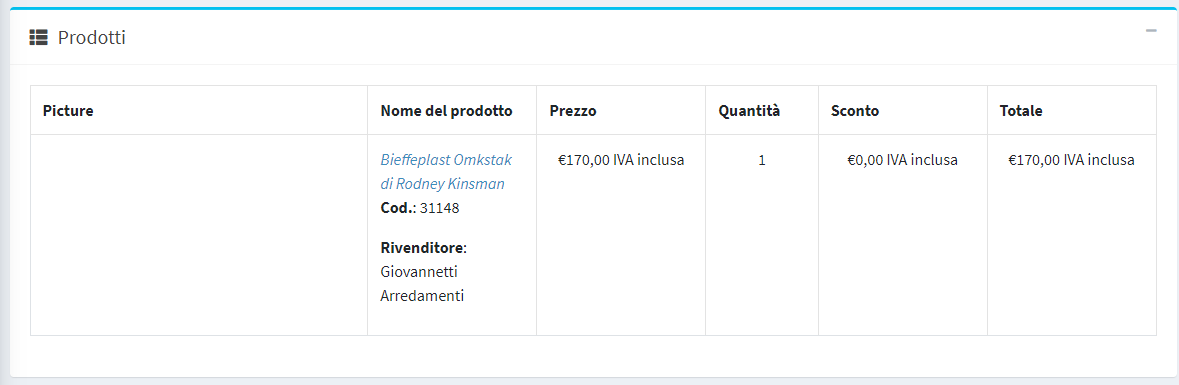
Bonifico Bancario

Sul Server

[modifica]

È necessario installare .NET 6.0, la versione Hosting Bundle da https://dotnet.microsoft.com/en-us/download/dotnet/6.0
Il server non chiede riavvio.

Per verificare che il framework sia presente digitare in una console:

dotnet --list-runtimes

per vedere .NET 6